

Multi-property management

Manage Multiple PGs and Hostels from One Account

Start with one property. When you add a second building, switch between them from the property picker, view them together, and give each warden access only to their own building.

Free forever · Live on Android & iOS · English & Hindi

✓Multi-property managementLive today
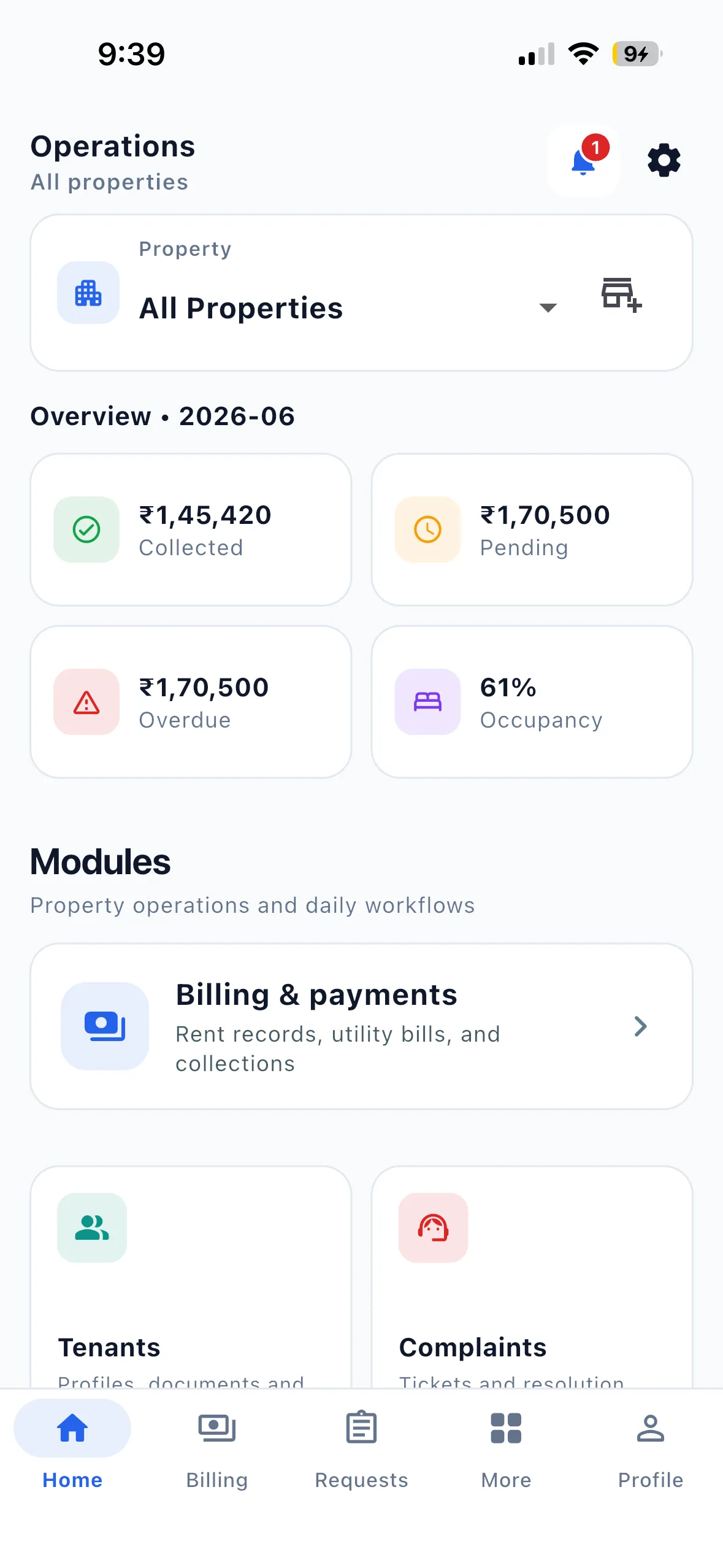
EasyAavaas owner home dashboard on iPhone
One clear workflowFrom the first update to the final status

EasyAavaas lets one owner account run several PGs, hostels or co-living buildings. A property picker switches between buildings, and the All properties view combines rent billed, collected, pending and overdue, occupancy, tenant counts, pending requests and payments to verify. Team access is given property by property, so a warden at one building does not see another. Reports are downloaded one property at a time. EasyAavaas is free forever, with no limit on properties or beds.

01

Start with one property

Most owners begin with a single PG, and nothing on this page is needed until you add a second building. Adding one uses the same create-property flow: name, address, boys, girls or co-ed, then rooms and tenants. Your existing property and its records are not touched.

02

Example: one owner, two buildings

Example: an owner runs a 24-bed boys PG (Building A) and a 16-bed girls PG (Building B) in the same city. A manager handles Building A and a warden handles Building B.

The owner's morning check: open All properties and see 36 of 40 beds occupied (90%) with combined pending and overdue rent. Then switch to Building B to see which tenants still owe and whether any complaint is waiting.

At month-end the owner downloads two Property Summary reports, one per building, and adds them up for the portfolio total.

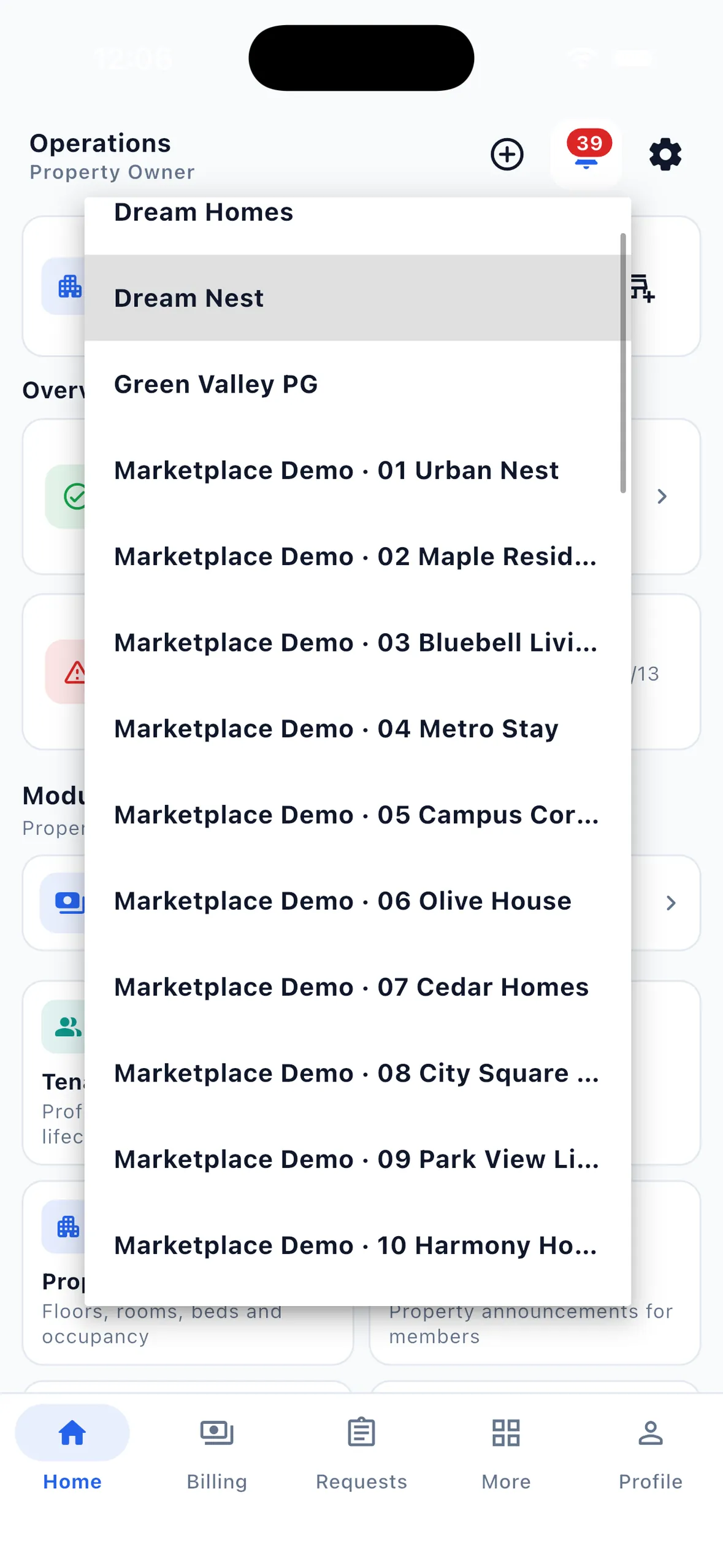
EasyAavaas Your properties sheet listing five test properties with your role, beds filled and amount to collect, plus Add a property and Join with a code
Test account: the property picker lists every property you own or work at.
Illustrative example, not a customer.
Building A (boys PG)Building B (girls PG)
Beds occupied21 of 2415 of 16
Day-to-day personManager, added at Building A onlyWarden, added at Building B only
What that person can openBuilding A records onlyBuilding B records only
What the owner seesBuilding A on its own, or combinedBuilding B on its own, or combined
Monthly reportProperty Summary for Building AProperty Summary for Building B
03

Switching properties and checking records

  1. Tap the property name at the top of Home, Billing, Requests or Complaints and pick a building, or choose All properties.
  2. In All properties, the home dashboard combines rent billed, collected, pending and overdue, occupancy, tenant counts, pending requests and payments to verify.
  3. Rent, deposit, complaint, request, visitor, notice and utility lists also cover every building in that view; each row shows its property name.
  4. Pick a single property to work on its rooms and beds, add tenants or download reports.
  5. Need to tell everyone something? A notice can go to one property or to all your properties at once.
04

Delegating access building by building

  1. Open the property, go to its team members, add the person by mobile number and choose a role: manager, warden, staff, accountant or support.
  2. They log in to EasyAavaas with their own number and an OTP. They see only the properties where they have been added.
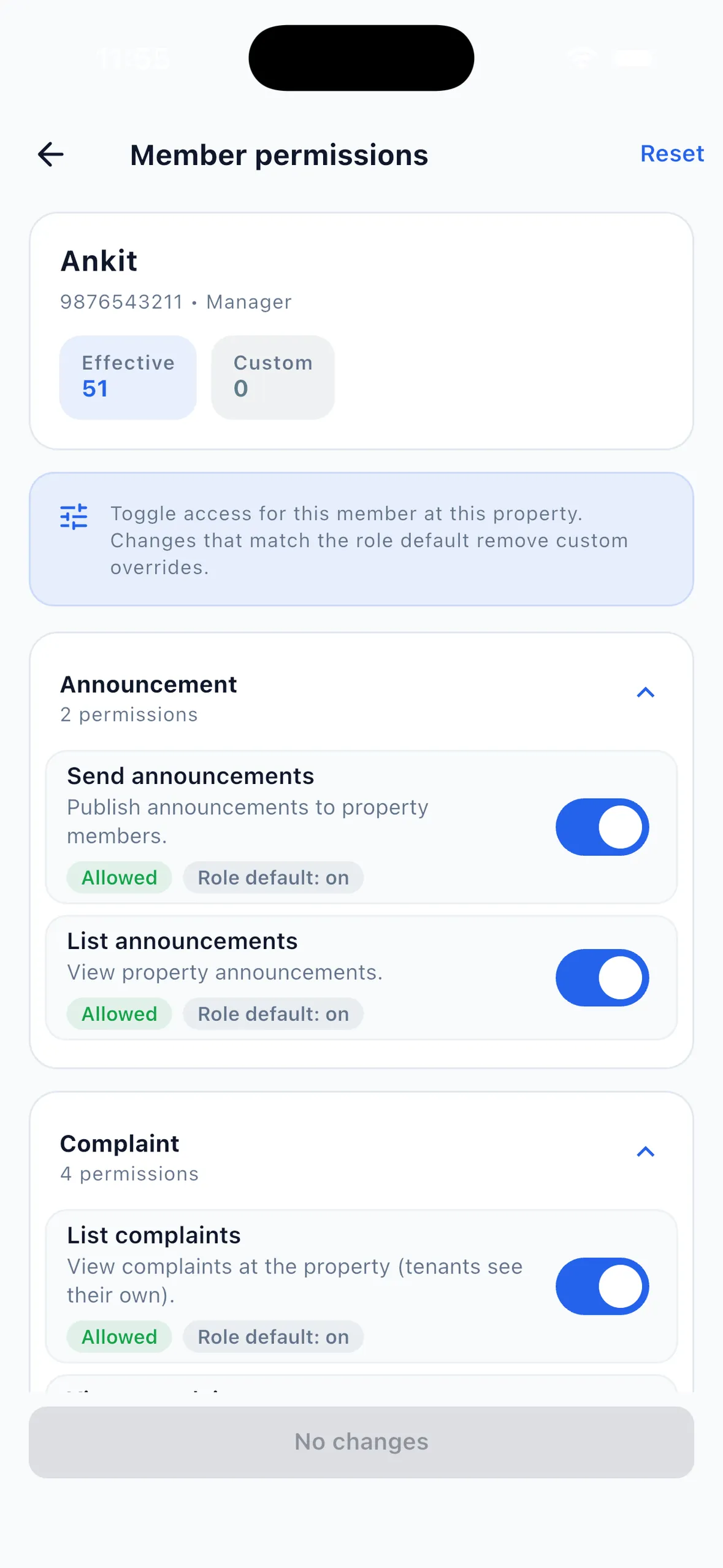
  3. Adjust what they can do in Member permissions. Each switch shows whether it matches the role default.
  4. To give someone two buildings, add them at both. Their role can differ — manager at one, warden at the other.
  5. When someone leaves, remove them from the property. The tenant, rent and complaint records stay with the property.
EasyAavaas member permissions screen for a manager showing permission groups, with Rent switches to see rent, create monthly bills and change or cancel a month's rent
Example record on a test property: one manager's permissions at one property.
05

What is combined and what stays separate

Records stay separate by property: a tenant, a bed or a rent record belongs to one building, and team access follows the property. The combined view is for looking across buildings, not for merging them.

ItemCombined across properties?
Home dashboard: rent, occupancy, tenant counts, requests, payments to verifyYes, in All properties
Lists: rent, deposits, complaints, requests, visitors, notices, utility billsYes, in All properties, each row labelled with its building
Rooms, beds and tenant recordsNo — each belongs to one property
Reports: Property Summary, Rent Ledger, Tenant DirectoryNo — downloaded one property at a time
Team members and permissionsNo — set per property
Rent schedule (due day, grace period, reminder timing)No — set per property by the EasyAavaas team on request
06

Limitations and price

  • Price: free forever — ₹0 a month, no per-property or per-bed fee, no limit on properties, rooms or beds.
  • No combined report export across properties; add up the per-property reports.
  • No owner-visible audit log of every change; recorded payments do show who collected them.
  • Property expense records are available; profit and loss and company-level accounts are not.
  • Android and iOS apps, plus a web portal for owners and authorised staff.

Why this matters

A second property should not double the work

Owners who add a second building often copy everything: another Excel file, another WhatsApp group, another warden who only knows their own building. The owner ends up as the only link between them.

×

What the day depends on now

  • One spreadsheet per property
  • Staff sharing one login, or no access at all
  • The owner called for every decision at every building
  • No quick view of rent and occupancy across buildings
!

What that quietly costs

  • Buildings run by different rules
  • Month-end figures assembled by hand from each site
  • Records leave with the warden when they leave
  • Hard to see which building needs attention

One login, every building

Each property keeps its own rooms, tenants, rent records and team. You see them one at a time or together.

  • Several properties under one owner account
  • Property picker on the main screens, including All properties
  • Combined dashboard for rent, occupancy, tenants and pending work
  • Lists for rent, complaints, requests and visitors across buildings
  • Team access added per property, by mobile number
  • Different roles for the same person at different properties
  • Per-person permission switches
  • Notices to one property or all of them
  • Property Summary, Rent Ledger and Tenant Directory per property

All features listed above are live in the app today.

Grow without spreadsheet sprawl

Leave this behind:

  • Three Excel files for three properties
  • Three WhatsApp groups with overlapping noise
  • Driving between sites to check numbers
  • An accountant receiving reports in different formats

Open one app, look across every building, then switch to the one that needs you. Each warden sees only their building, and each property's report comes out in the same format.

Read: 7 ways accommodation owners lose money →

Who it fits

  • Owners adding a second PG
  • Families running several buildings
  • Hostel operators with separate blocks
  • Co-living operators with several houses

Multi-property management — on video

Watch the Hindi product demo and relevant setup tutorials from our YouTube channel.

Free PG Management App + WhatsApp AI Assistant | EasyAavaas Demo (Hindi)

A Hindi walkthrough of daily PG operations with EasyAavaas and WhatsApp: rent records, payment proof and reminders, tenant documents, utility bills, complaints, visitors, notices, team permissions and reports. Rent money goes directly to you; the app keeps the records.

Some screens and messages are reconstructed with example data. Notifications depend on the relevant settings and an available WhatsApp contact.

How to Create Your First Property | EasyAavaas Tutorial

Set up your first property end to end — OTP login, property details, location, house rules, late rent policy, and amenities.

How to Add Rooms & Manage Occupancy | EasyAavaas Tutorial

Add floors and rooms, configure sharing, set bed-wise or room-wise rent, add room amenities, and track occupancy as you assign tenants.

All tutorials on YouTube

Frequently asked questions

Common questions about running more than one PG or hostel in EasyAavaas.

How many properties can I add?

There is no limit on properties or beds, and no per-property fee. EasyAavaas is free forever for owners, managers and tenants.

Can a warden see only their own building?

Yes. Team access is given per property. A warden added at one building cannot open another unless you add them there too, and you can switch individual permissions on or off for them.

Can I see all my properties together?

Yes. Choose All properties in the property picker. The home dashboard then combines rent, occupancy, tenant counts, pending requests and payments to verify, and lists such as rent, complaints and visitors show every building.

Can I download one report for all properties?

Not today. Property Summary, Rent Ledger and Tenant Directory are downloaded one property at a time as Excel or PDF. Add the property summaries together for a portfolio total.

Do I need anything extra if I have only one PG?

No. A single-property owner uses the same app. The property picker simply shows one building until you add another.

Related solutions

Explore other operational modules — or combine them on one platform.

Bring the team together

Run every building from one app

Download EasyAavaas, set up your first property, and add the next one when you are ready. Free forever, with no property limit.