

Occupancy management software

Occupancy Management Software for PGs, Hostels & Co-Living Spaces

Track occupied and vacant beds across your rooms and properties. A room can be partially occupied while individual beds remain vacant. Keep assignments current and use the calculator to check one available-bed snapshot.

Free forever · Live on Android & iOS · English & Hindi

✓Occupancy management softwareLive today
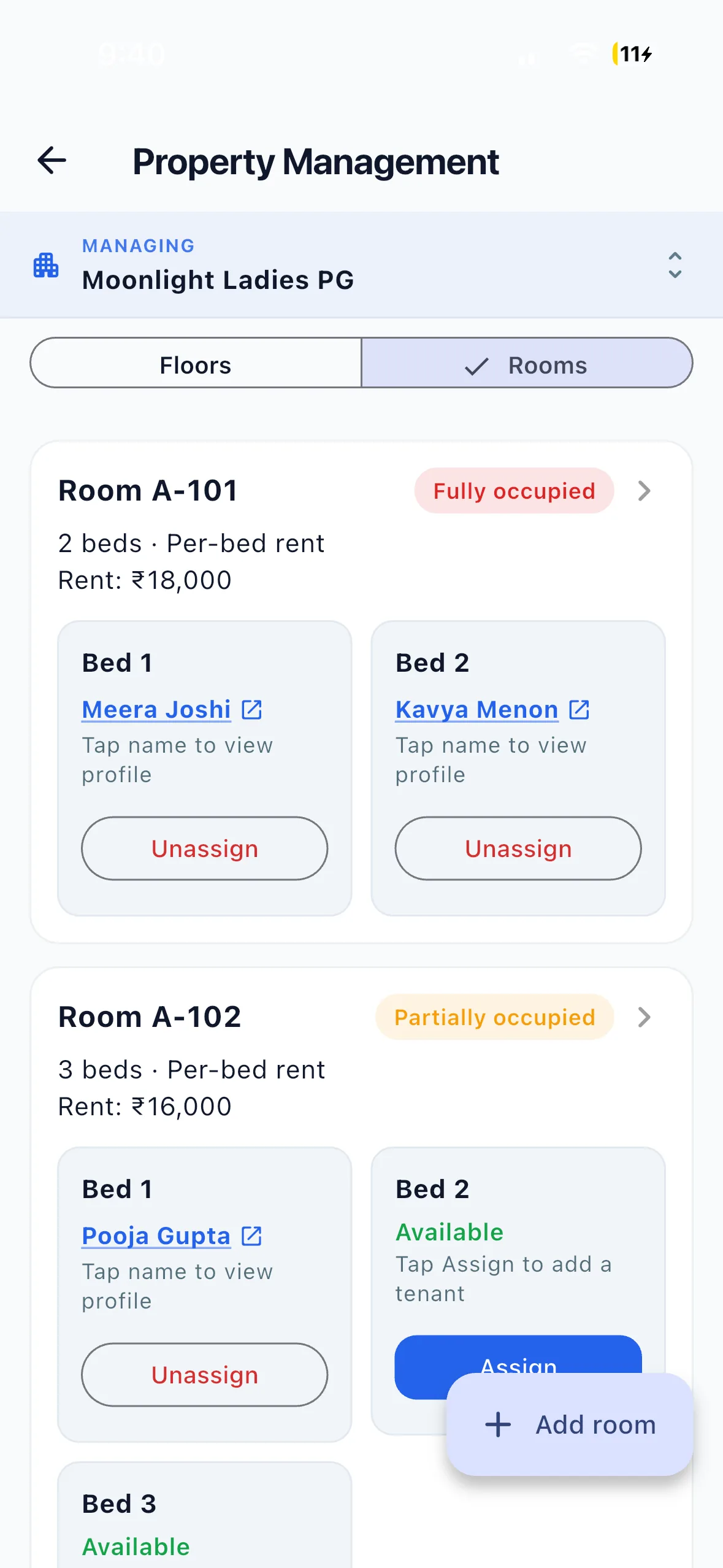
EasyAavaas property and rooms screen on iPhone
One clear workflowFrom the first update to the final status

Free planning tool

PG bed occupancy calculator

Bed occupancy is occupied beds divided by available beds, multiplied by 100. Count beds available to rent; exclude beds closed for repairs. A four-bed room with three residents has 75% bed occupancy.

No signup needed. These numbers stay in your browser.

Bed occupancy
80.0%
Vacant beds
10
Potential gross rent from vacant beds / month
₹70,000

This estimate assumes every vacant bed is occupied for a full month at the rent entered. It excludes costs, concessions, partial stays and unpaid rent. It is not a revenue forecast or a promise that software will fill your beds.

Review the same snapshot each week, record upcoming move-outs, and check vacancies by sharing type. Use EasyAavaas to keep bed assignments and occupancy reports together.

Track your beds in EasyAavaasRead the bed occupancy tracking guide →

Why this matters

You cannot fill beds you cannot see

Walk-in prospects ask “Is a bed available?” and too many operators still answer “Let me check.” Vacancy data lives in notebooks, WhatsApp messages, and memory — which makes it harder to give a reliable answer.

×

What the day depends on now

  • Room-level tracking when beds are shared (2, 3, or 4 per room)
  • Warden notebooks updated days late
  • Phone calls to confirm every walk-in enquiry
  • Move-out dates buried in chat threads
!

What that quietly costs

  • Vacant beds stay empty longer than necessary
  • Walk-in prospects leave before you confirm availability
  • Double bookings and allocation disputes
  • Month-end occupancy rebuilt manually in Excel

Bed-level occupancy in real time

EasyAavaas tracks occupancy at floor, room, and bed level — live today. See vacant, partially occupied, and fully occupied status instantly across PGs, hostels, and co-living properties.

  • Floor, room, and bed layout with live occupancy status
  • Auto status: vacant, partial, or fully occupied per room
  • Per-bed or per-room rent billing modes
  • Assign, move, and vacate tenants at bed level
  • Boys, girls, and co-ed property setup
  • Occupancy visible to owners and permitted staff
  • Occupancy reports exportable as Excel or PDF
  • Multi-property dashboards from one account

All features listed above are live in the app today.

Give a clearer availability answer

Leave this behind:

  • “Let me call the warden” for every walk-in
  • One empty bed invisible inside an “occupied” room
  • Move-outs discovered only after the bed is empty
  • Occupancy checked once a month in Excel

Answer “Yes, one bed available — move-in today” in seconds. Track upcoming move-outs before beds go empty. Review occupancy weekly and export reports for planning — not guesswork.

Read: How to track occupancy and reduce vacant beds →

Built for

  • PG owners
  • Hostel operators
  • Co-living spaces
  • Student accommodation
  • Multi-property operators

Occupancy management software — on video

Watch the Hindi product demo and relevant setup tutorials from our YouTube channel.

EasyAavaas Hindi Demo — PG Management with the App & WhatsApp

A Hindi walkthrough of daily PG operations with EasyAavaas and WhatsApp: rent records, payment proof and reminders, tenant documents, utility bills, complaints, visitors, notices, team permissions and reports. Rent money goes directly to you; the app keeps the records.

Some screens and messages are reconstructed with example data. Notifications depend on the relevant settings and an available WhatsApp contact.

How to Add Rooms & Manage Occupancy | EasyAavaas Tutorial

Add floors and rooms, configure sharing, set bed-wise or room-wise rent, add room amenities, and track occupancy as you assign tenants.

How to Add Your First Tenant | EasyAavaas Tutorial

Add your first tenant — assign a room, record the security deposit and rent, upload documents, add an emergency contact, and complete move-in.

All tutorials on YouTube

Frequently asked questions

Common questions about occupancy management software with EasyAavaas.

Does EasyAavaas track beds or only rooms?

Bed level. A four-sharing room with three tenants shows as partially occupied — one vacant bed is visible immediately. This is essential for Indian PGs, hostels, and co-living spaces.

Can I see occupancy across multiple properties?

Yes. One owner account can manage multiple properties. Switch between PGs, hostels, or co-living sites and filter occupancy reports by property.

How is occupancy status updated?

Status updates when tenants are assigned, moved, or vacated at bed level. Rooms auto-show as vacant, partial, or fully occupied based on bed assignments.

Can I export occupancy reports?

Yes. Owners and permitted staff can generate occupancy reports from the Reports module and download as Excel (.xlsx) or PDF — useful for planning and accountant handoffs.

Is occupancy tracking free?

Yes. Bed-level occupancy and reports are included in EasyAavaas at no cost for owners, managers, staff, and tenants.

Related solutions

Explore other operational modules — or combine them on one platform.

Bring the team together

Ready to see every bed — vacant or full?

Stop guessing occupancy. Free download for PG, hostel, and co-living properties across India.