

Tenant management software

Tenant management software for PG records and documents.

Keep each tenant’s joining date, room and bed, rent, deposit, contact details, emergency contacts and documents in one record that you, your permitted staff and the tenant can open.

EasyAavaas is free forever for PG, hostel and co-living owners, staff and tenants. Tenants upload their own documents; you or a permitted manager review them.

Practical guide · Live product workflow · Built for India · Updated

✓Tenant management softwareA practical path
EasyAavaas tenant management screen on iPhone
EasyAavaas guideWhat to do, when to do it, and why

Tenant record overview. Example record on a test property, not customer data.

EasyAavaas is free tenant management software for PG, hostel and co-living owners in India. Each tenant has one record with joining date, room and bed, monthly rent, security deposit, work and contact details, several emergency contacts and uploaded documents. Tenants or your staff upload ID proof, address proof and agreements, and you or a permitted manager review them and mark the profile verified. This is document collection and review by you, not Aadhaar, DigiLocker or police verification.

01

What a tenant record holds

A notebook page or a WhatsApp chat holds some of this. A tenant record in EasyAavaas holds all of it in one place, and the same record drives rent, reminders, complaints and move-out.

Part of the recordWhat you can storeWhy it matters
IdentityName on record, mobile number, gender and age.The mobile number is how the tenant logs in and receives reminders.
Work and stayOccupation, company or workplace, student or working, hometown and food preference.Useful when you decide who shares a room, or need to reach a tenant’s workplace.
Rent and statusRoom and bed, monthly rent, joining (move-in) date and status: pending, active, moving out or inactive.Rent records and reminders are created from these details.
Security depositAmount, paid, remaining and each linked payment with method, UTR and proof.Move-out checks the deposit before the bed is freed.
DocumentsID proof, address proof, agreement, selfie or other: up to 12 files of 12 MB each, as JPG, PNG, WebP, GIF, PDF or Word.Reviewed by you; the record shows whether they are submitted and verified.
Emergency contactsSeveral per tenant: name, phone, relation, type (personal, medical, property, utility or other), a note and whether they are reachable 24x7.The right person is one tap away at night, without searching old chats.
02

Add a tenant and the joining details

The full add-tenant flow takes five steps. Owners, managers and wardens can add and edit tenants by default.

In a hurry, use the quick two-step add and complete the rest later. Moving a full PG across, add up to 25 people at once from your phone contacts with floor, room, bed, rent, deposit and move-in date. Only the people you pick are saved; your contact book is not uploaded. There is no Excel or CSV import.

  1. Identity: name and mobile number, plus gender and age.
  2. Work and stay: occupation, company, student or working, hometown and food preference.
  3. Rent and status: room and bed, monthly rent and joining date, with the security deposit created at the same time if you want.
  4. Documents: upload ID or address proof now, or leave it for the tenant to upload from their own app.
  5. Emergency contact: add one now and more later.
03

Document collection and review for PG KYC

When owners say “PG KYC”, they usually mean collecting a tenant’s ID and address proof and checking it before move-in. In EasyAavaas that is a document collection and review workflow that you run.

The tenant list shows a badge for each person: not submitted, submitted or verified. That makes it easy to see who still owes you documents before the month gets busy.

  1. Ask the tenant to upload documents under My documents in their app, where they are shared with your property. Or upload them yourself from the tenant’s profile.
  2. If documents are missing, send the tenant an upload reminder from their profile.
  3. Open each document and compare it with the original ID and the person in front of you.
  4. Mark the profile verified. The record keeps who verified it and when, and the tenant is notified.
  5. If a new document is uploaded later, the verified mark clears automatically so it is reviewed again. You can also undo a verification yourself.
EasyAavaas tenant documents awaiting review with upload, Mark profile verified and remind to upload options
Documents awaiting review. Example record on a test property.

Verification limits: marking a profile verified records that you or your staff checked the documents. EasyAavaas does not check documents against Aadhaar, DigiLocker, e-KYC or police databases, and using it does not make a property compliant with any law. If your city requires police verification of tenants, complete it through the official process, keep the acknowledgement in the tenant’s documents and check current local rules.

04

Who can see tenant records and documents

Uploaded documents are visible to people with access to that tenant’s record in the app. Give tenant permissions only to staff who need them, and remove a member from the property when they leave your team.

Each user can see the devices logged in to their account and log out the others from the login and security screen.

  • Owner: every tenant record in every property you own.
  • Manager and warden: add, edit and move out tenants in the properties they belong to, by default.
  • Accountant, staff and support: start with the property, member list and notices only. Turn on further permissions for a person only if their job needs it.
  • Tenant: their own profile, documents, rent records and deposit, through the tenant app.
05

Finding a tenant’s details later

A record helps only if you can find it on a busy day. Open the tenant’s profile for everything about one person, and export a report when you need a list for your accountant or your own files.

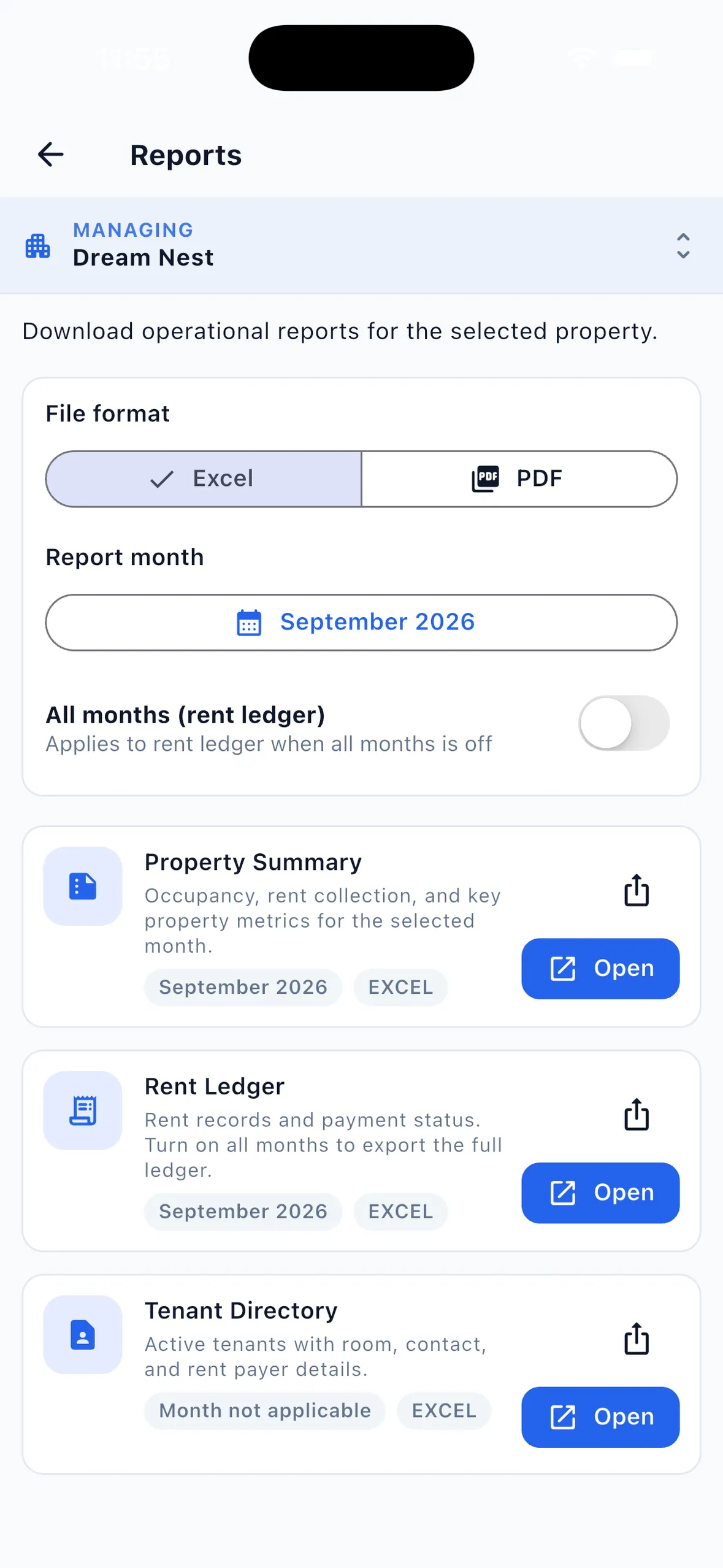
EasyAavaas reports screen with Excel and PDF formats, a report month and the Property Summary, Rent Ledger and Tenant Directory reports
Reports you can export, including the Tenant Directory. Example records on a test property.
  • On the phone: open the tenant list and the person’s profile to see their room, rent, deposit, documents and emergency contacts.
  • As a report: the Tenant Directory exports current tenants as Excel or PDF with name, phone, room, bed, rent, deposit, status and move-in date.
  • For money questions: the Rent Ledger report lists what each tenant owed, paid and still owes, month by month.
  • At move-out: the record is not erased. It is marked inactive with the move-out date, and the tenant’s app access to that property ends.
06

Retention and deletion

Property and tenant records are kept to run your property and may be retained according to your operational needs and record-keeping requirements, as the privacy policy explains. Do not treat the app as permanent storage for papers you are legally required to keep; export the reports you need and keep copies of critical documents.

There is no self-service delete button. To delete an account, submit the request on the delete account page or email [email protected]. The team verifies and processes it, with a target of 30 days. Some records may be retained where the law or a legitimate need requires it.

Collect only the documents you actually need, and tell tenants why you need them. Owners are responsible for having the tenant’s consent to upload their documents.

07

What tenant management in EasyAavaas does not include

Tenant records, documents, deposits and the tenant app are free forever for owners, staff and tenants: ₹0 a month, with no per-bed or per-property fee. These are the boundaries to know before you rely on it.

  • No Aadhaar, DigiLocker, e-KYC or police verification integration.
  • No agreement drafting or e-signing. Upload a signed agreement as a document.
  • No Excel or CSV import of tenant lists.
  • No email notifications. Tenants hear from you by app notification and WhatsApp.
  • No owner web dashboard. Records are managed in the Android and iOS apps.

Frequently asked questions

Common questions about tenant management software with EasyAavaas.

Can tenants upload their own KYC documents?

Yes. Tenants upload ID proof, address proof, agreements or other documents from their own app, where they are shared with your property. You or permitted staff can also upload them from the tenant profile, and you can send a reminder when documents are missing.

Does EasyAavaas verify Aadhaar or do police verification?

No. EasyAavaas supports document collection and review: you or a permitted manager check the uploaded documents and mark the profile verified. It does not connect to Aadhaar, DigiLocker, e-KYC or police systems. Complete any required police verification through the official process.

Who can see a tenant’s documents?

People with access to that tenant’s record in the app: the owner, managers and wardens by default, plus any staff member you give tenant permissions to. The tenant can see their own documents.

Can I store emergency contacts for each tenant?

Yes. Add several emergency contacts per tenant with name, phone, relation, a type such as personal or medical, a note and whether they are reachable 24x7.

What happens to a tenant record after move-out?

Move-out first checks unpaid rent, items issued to the tenant and the deposit. After that the bed is freed, the tenant is marked inactive with the move-out date and their app access to that property ends. The record is not erased.

Is tenant management in EasyAavaas free?

Yes. Tenant records, document review, deposits and the tenant app are free forever for owners, staff and tenants, with no per-bed or per-property fee.

Watch the walkthroughs

Short videos from our YouTube channel showing these workflows in the live app.

Free PG Management App + WhatsApp AI Assistant | EasyAavaas Demo (Hindi)

A Hindi walkthrough of daily PG operations with EasyAavaas and WhatsApp: rent records, payment proof and reminders, tenant documents, utility bills, complaints, visitors, notices, team permissions and reports. Rent money goes directly to you; the app keeps the records.

Some screens and messages are reconstructed with example data. Notifications depend on the relevant settings and an available WhatsApp contact.

How to Add Your First Tenant | EasyAavaas Tutorial

Add your first tenant — assign a room, record the security deposit and rent, upload documents, add an emergency contact, and complete move-in.

All tutorials on YouTube

Related pages

Continue with the page that answers your next question.

Bring the team together

Put every tenant’s details in one record.

Download the free app, add your first tenant with their documents and emergency contact, and mark the profile verified once you have checked it.