PG management software

PG management software, from move-in to checkout.

Follow every stage of running a paying guest property in EasyAavaas: tenant arrival, bed allocation, rent records and payment proof, reminders, complaints and notices, deposits and exit. Then use the same checklist to evaluate any PG management system.

EasyAavaas is free forever for PG owners, managers, staff and tenants: ₹0 a month, no per-bed or per-property fee, no setup fee and no commission on rent. Tenants pay you directly; the app keeps the records.

Practical guide · Live product workflow · Built for India · Updated

✓PG management softwareA practical path
EasyAavaas room detail showing two occupied beds with rent and dues
EasyAavaas guideWhat to do, when to do it, and why

Room screen with bed-wise tenants and dues. Example records on a test property, not customer data.

EasyAavaas is PG management software for paying guest owners in India. One Android and iOS app keeps the whole tenant stay together: move-in and bed allocation, monthly rent records, payments tenants make to you directly by UPI or cash with their proof, automatic WhatsApp rent reminders, complaints, notices, security deposits and a checked move-out. It is free forever for owners, staff and tenants, with no limit on properties or beds, and it never collects or holds your rent.

01

Who this PG management system is built for

Start with the owner who runs a 10 to 60 bed PG alone: you show rooms, take rent on UPI or in cash, answer complaints and keep a notebook of who has paid. EasyAavaas replaces that notebook and most of the follow-up calls with records on your phone. When you add a manager, a warden or a second building, the same records extend to them, each with their own login.

  • Solo owner, one PG: rooms, beds, tenants, rent and complaints on your phone. No staff needed.
  • Owner with a manager or warden: each person logs in with their own mobile number, and you choose what they can see and change.
  • Several PGs: switch between properties, or see all of them together on the home dashboard.
  • Boys, girls or co-ed PGs: choose the property type when you create the property.
  • Hostels, co-living and shared rental rooms run on the same room-and-bed records. See the hostel and co-living pages for their specific fit.
02

The PG lifecycle a management system has to cover

Most PG problems come from one stage handing over badly to the next: a bed promised twice, a payment that was “sent” but never checked, a deposit returned before the electricity bill was paid. This is what each stage needs, and where EasyAavaas keeps it.

Each stage is explained below with a real app screen from a test property.
StageWhat you need to knowWhere EasyAavaas keeps it
Enquiry and arrivalIs a bed free? What rent, deposit and joining date were agreed?The room screen shows vacant and occupied beds. The add-tenant steps record rent, deposit and joining date.
Bed allocationWhich room and bed, and who pays for it?Per-bed or per-room billing, chosen for each room.
Monthly rentWho owes what this month?A rent record for every assigned tenant, created on the due day.
Payments and proofDid the money actually reach you?Payments you record count as verified. Proof a tenant submits waits for your approval.
Follow-upsWho still needs a reminder?One automatic reminder before the due date and one overdue message after the grace period.
Complaints and noticesWhat is open, who is fixing it, and what was everyone told?Complaints with priority, assignee and status. Notices to all active members.
Deposit and checkoutIs everything settled before the bed is freed?Move-out stays blocked until rent is cleared, issued items are back and the deposit is settled or marked for later refund.
03

Stage 1: Tenant arrival and bed allocation

EasyAavaas does not run an enquiry or online booking pipeline. When someone calls about a bed, open the room screen to see which beds are vacant. When they confirm, add them as a tenant and give them the bed.

  1. Log in with your mobile number and OTP, create the property and choose boys, girls or co-ed.
  2. Add floors and rooms. For each room, set the number of beds, the sharing type and the billing mode: per bed (each tenant pays their own rent) or per room (one tenant pays for the whole room).
  3. Add the tenant in five short steps: identity, work and stay details, rent and deposit, documents, and an emergency contact. A quick two-step add is there when you are in a hurry.
  4. Pick a vacant bed. If the room does not exist yet, create it from the same step, or enrol the tenant without a room and assign the bed later.
  5. Moving an existing PG across? Add up to 25 tenants at once from your phone contacts, with floor, room, bed, rent, deposit and move-in date. There is no Excel or CSV import.
EasyAavaas add tenant step listing vacant rooms and beds to choose from, an option to enroll without a room and a button to create a room
Add tenant, step 2: choose a vacant bed. Example records on a test property.

You cannot reserve or block a bed for someone who has not moved in yet, so keep confirmed arrivals on your own list until move-in day. A room that is out of use for repairs can be marked under maintenance.

04

Stage 2: Rent records, direct payments and proof

On the due day (the 1st by default), EasyAavaas creates a rent record for every assigned tenant at their full monthly rent. Electricity or other charges you add for that month attach to the same record, so the tenant sees one total.

Tenants pay you directly by UPI, cash or bank transfer, and the payment reaches the record in one of two ways. You record it: open the rent record, record the payment with amount, method and UTR, and attach a screenshot if you have one. Your entry counts as verified straight away, and a part payment leaves the balance open. The tenant submits it: the tenant enters the amount, method, UTR and proof in their app. It waits as a request until you or a permitted manager approves it (you can change the approved amount) or rejects it with a reason.

A screenshot is evidence, not settlement. Check your bank or UPI app before approving. EasyAavaas is not a payment gateway, does not hold money and does not reconcile with your bank account.

The app does not create rent receipts. The tenant gets an app notification and a WhatsApp message when a payment is recorded or verified. If a tenant needs a written receipt, use the PG rent receipt template.

EasyAavaas record payment form with amount, UPI, cash or other method, a payment proof attachment, UTR and notes
Recording a payment the owner received. Example record on a test property.

Example with illustrative figures: a tenant who joins mid-month at ₹8,000 a month. Monthly rent is generated at the full amount, with no automatic pro-rata. If you agreed ₹4,500 for the part month, change that record’s amount with Adjust before you send a reminder.

05

Stage 3: Rent reminders and follow-ups

Reminders start on their own once tenants have rent records. A tenant with an unpaid record gets one reminder 3 days before the due date and one overdue message after the grace period (3 days by default), as an app notification and on WhatsApp. You and your managers get a summary instead of a call list. Nobody receives repeated daily messages.

EasyAavaas tenant profile showing monthly rent, move-in date and a Send rent reminder button
Tenant profile with the manual reminder button. Example record on a test property.
  • The due day, grace period and reminder timing are set for your property by the EasyAavaas team. Message the team to change them; they are not edited in the app.
  • To nudge one tenant yourself, open their profile and tap Send rent reminder.
  • Late fees can be a fixed amount, a daily amount after the grace period or a percentage of rent. The app suggests the fee and never adds it without your confirmation.
  • The WhatsApp AI assistant can list who still owes and send reminders to the tenants you confirm. It is included free after your account is activated: message the team on WhatsApp at +91 78787 65818 to request access.
06

Stage 4: Complaints, requests and notices

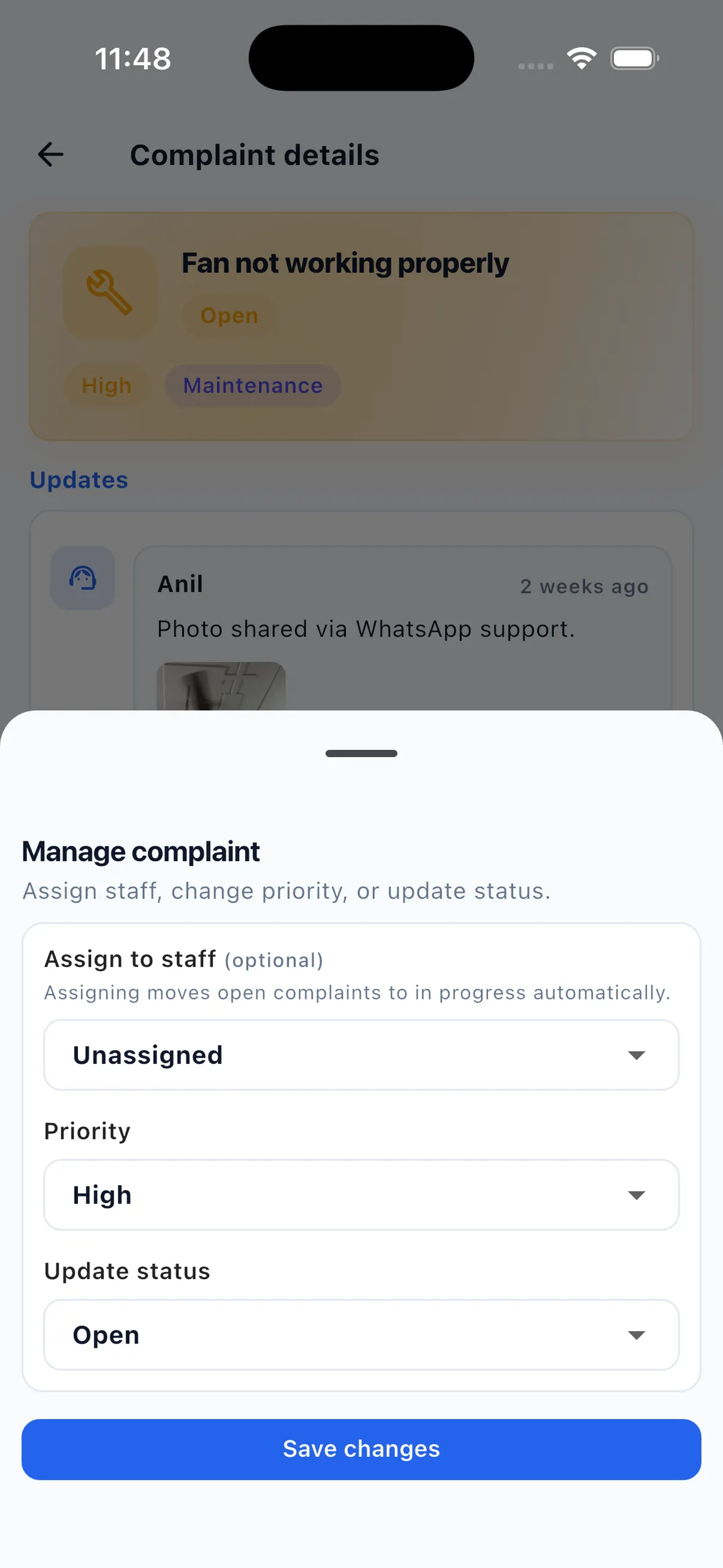
Tenants raise complaints in the app with a category (plumbing, electrical, cleaning, food and others), a priority and photos. Complaints with photos can also come in through the WhatsApp assistant. You or a manager assign the complaint to a staff member, post updates the tenant can see or internal notes they cannot, and mark it resolved. If a complaint stays unresolved for 24 hours, the next daily check raises its priority by one level and alerts the owner and managers.

Room changes, vacating, refunds and visitor entries arrive as requests that you approve or reject with a note, so a decision is not lost in a chat.

For property-wide messages, publish a Notice or a high-priority Update. It goes to every active member of the property as an app notification, in the in-app inbox and on WhatsApp, and you can send it to all your properties at once. The app shows the notice and who it was addressed to; it does not show which tenant read it.

EasyAavaas manage complaint screen for assigning a staff member, setting priority and changing status
Assigning a complaint and setting its priority. Example record on a test property.
07

Stage 5: Security deposits and checkout

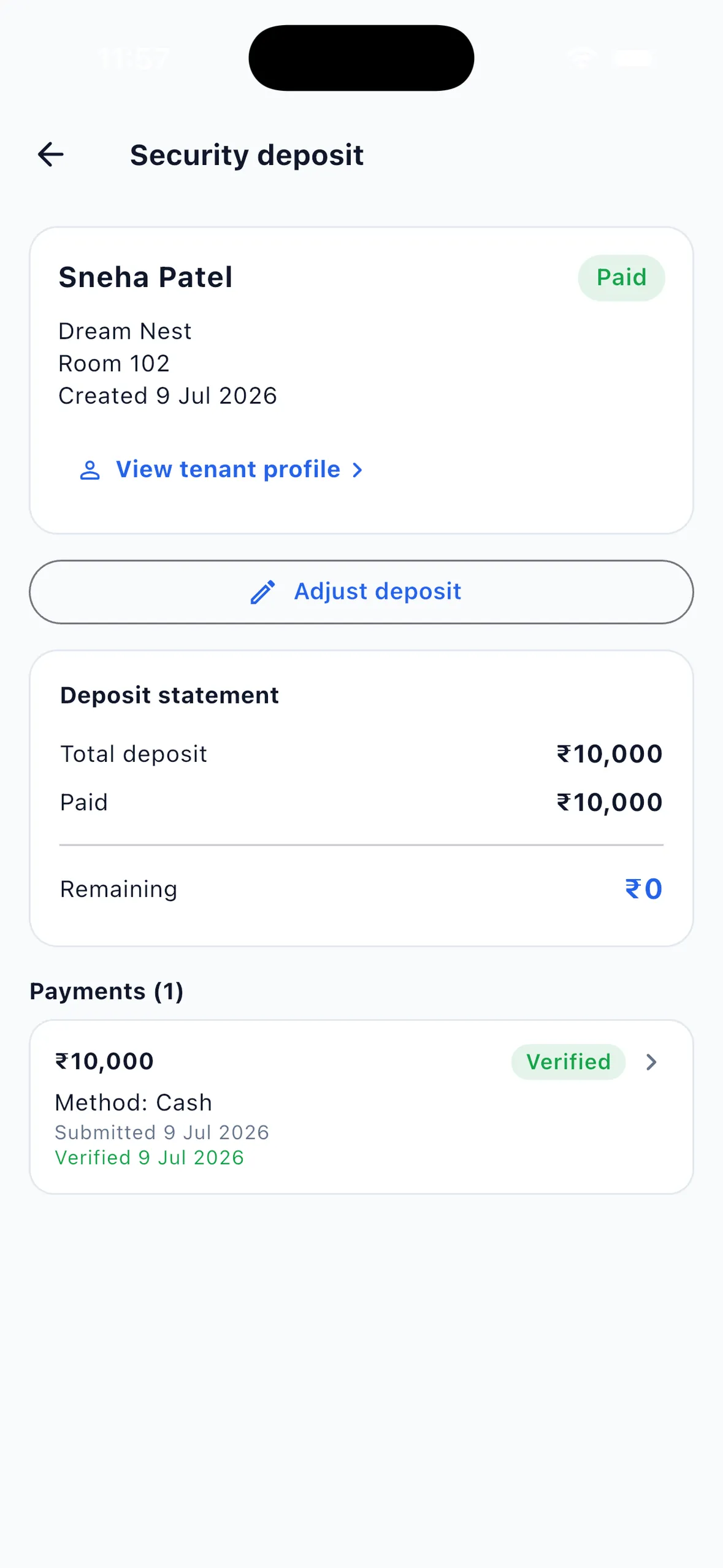
Record the security deposit when you add the tenant, or later. EasyAavaas tracks the amount, what has been paid, what remains and each linked payment with its method, UTR and proof. A tenant can also submit deposit proof for you to approve.

When a tenant leaves, move-out runs its checks in order. It is blocked while any rent is unpaid. It is blocked while items issued to the tenant, such as keys or a router, are not returned, unless the owner overrides. It is blocked while the deposit has an unpaid balance or a payment awaiting verification. You then record the refund now, with method and note, or mark it to be refunded later. In a room billed per room, you also choose who pays the room’s rent next.

After move-out, the bed is freed, the tenant is marked inactive with the move-out date, and their app access to that property ends.

EasyAavaas deposit statement showing total deposit, amount paid, remaining balance and a verified cash payment
A tenant’s deposit statement. Example record on a test property.

Deductions are not itemised. The move-out step records a refund of the full amount due, with a free-text note. If you deduct anything, agree it with the tenant first, write it in the note and keep your own checklist. This is record-keeping guidance, not legal advice.

08

How to evaluate any PG management system

Use these criteria for every option you shortlist, including EasyAavaas. Ask each vendor to show the answer in their app, not in a brochure. The last column is how EasyAavaas answers on 23 October 2026.

Comparing named products? Read the comparison of PG management software in India, which EasyAavaas publishes with dated sources for every vendor fact.

Checked against the current EasyAavaas app on 23 October 2026.
CriterionWhat to askHow EasyAavaas answers
Owner feeIs there a monthly, per-bed or setup fee, or a commission on rent? Is “free” a trial?₹0 a month, free forever for owners, staff and tenants. No per-bed or per-property fee, no setup fee, no commission. There is no paid plan.
LimitsIs there a cap on properties, rooms, beds or tenants?No limit on properties or beds. WhatsApp assistant chats have a daily message limit per conversation, after which a person from the team takes over.
Property typesDoes it fit your building, or only one kind of PG?Boys, girls and co-ed PGs, hostels, co-living and shared rental rooms, set up as floors, rooms and beds. Not built for hotels, nightly bookings or whole-flat leases.
Per-bed vs room billingCan a shared room bill each tenant separately and a private room as one?Both. Per-bed billing is the default; per-room billing makes one tenant the room’s rent payer.
Direct-payment recordingDoes money pass through the vendor? How is proof checked?Tenants pay you directly. Record cash or UPI yourself, or approve tenant-submitted proof with UTR. No gateway, no bank reconciliation.
WhatsApp capabilitiesWhich messages go on WhatsApp, and do they cost extra or need setup?Rent reminders, overdue messages, notices and complaint updates go on WhatsApp by default at no cost to you. The AI assistant (dues, payments, reminders, notices by chat) is included free after the team activates your account.
DevicesPhone, web or desktop? Does it work offline?Android and iOS apps. No owner web dashboard, no desktop software and no offline mode.
PermissionsCan each staff member have their own login and limited access?Manager, warden, accountant, staff and support roles, plus per-person permission switches. Accountant and staff roles see no rent or payments until you allow it.
OnboardingHow do existing tenants get in, and who helps?Add up to 25 tenants at once from phone contacts, or one at a time. Guided in-app tour, video tutorials and WhatsApp support. No Excel import.
Data exportCan you take your records out?Property Summary, Rent Ledger and Tenant Directory reports as Excel or PDF, one property at a time. No deposit or expense report and no full database export.
09

Price, payment model and what EasyAavaas does not do

EasyAavaas is free forever for PG owners, managers, staff and tenants: ₹0 a month, no per-bed or per-property fee, no setup fee and no commission on rent. EasyAavaas also absorbs the cost of the WhatsApp messages it sends. The WhatsApp AI assistant is included at no charge once your account is activated. Know the boundaries below before you move your records.

  • It does not collect, hold or transfer rent. Tenants pay you; the app records it.
  • It does not generate rent receipts or GST invoices.
  • It does not take online bookings or hold a bed before move-in.
  • It does not itemise deposit deductions.
  • It does not verify identity with Aadhaar, DigiLocker or police records. You collect and review documents yourself.
  • It does not track staff attendance, mess menus or expenses.
  • It does not import from Excel, work offline or run on a desktop.
10

PG management software in your city

The app and the price are the same across India. These pages add a local operating example and setup notes for owners in six cities.

11

Next step: watch it, download it or read it in Hindi

For the short version, the homepage explains the free offer and the WhatsApp assistant in a few minutes: get the free PG management app.

To see this workflow in the real app, watch the Hindi product demo (4:57). To start today, download EasyAavaas for Android or iOS, add one room and one tenant, and follow a rent record through to a recorded payment.

यह गाइड हिंदी में भी उपलब्ध है: हिंदी में पढ़ें।

Frequently asked questions

Common questions about pg management software with EasyAavaas.

What is PG management software?

PG management software keeps the records of a paying guest property in one place: rooms and beds, tenants, monthly rent, payments, reminders, complaints, notices and deposits. EasyAavaas is a free PG management app for Android and iOS that covers these from move-in to move-out.

Is a PG management system different from a PG management app?

People use the words for the same thing. In EasyAavaas the system is the shared set of records, and owners, staff and tenants use it through the Android and iOS app. There is no separate desktop or web version for owners.

Is EasyAavaas an online PG management system?

Yes, in the sense that records are stored online and shared between the owner, staff and tenant apps, so everyone sees the same rent and complaint status. You need an internet connection; there is no offline mode.

Does EasyAavaas collect rent from my tenants?

No. Tenants pay you directly by UPI, cash or bank transfer. You record the payment, or the tenant submits proof for you to approve. EasyAavaas is not a payment gateway and does not hold money.

Can I move my existing tenants without typing everything again?

You can add up to 25 tenants at once from your phone contacts, with floor, room, bed, rent, deposit and move-in date. There is no Excel or CSV import, so use your register as the source while you add them.

Is it worth using for a 10-bed PG I run alone?

Yes. A small PG gets the same rent records, automatic reminders, payment proof and complaint tracking at no cost. Adding a manager or warden is optional.

Watch the walkthroughs

Short videos from our YouTube channel showing these workflows in the live app.

Free PG Management App + WhatsApp AI Assistant | EasyAavaas Demo (Hindi)

A Hindi walkthrough of daily PG operations with EasyAavaas and WhatsApp: rent records, payment proof and reminders, tenant documents, utility bills, complaints, visitors, notices, team permissions and reports. Rent money goes directly to you; the app keeps the records.

Some screens and messages are reconstructed with example data. Notifications depend on the relevant settings and an available WhatsApp contact.

How to Create Your First Property | EasyAavaas Tutorial

Set up your first property end to end — OTP login, property details, location, house rules, late rent policy, and amenities.

How to Add Rooms & Manage Occupancy | EasyAavaas Tutorial

Add floors and rooms, configure sharing, set bed-wise or room-wise rent, add room amenities, and track occupancy as you assign tenants.

How to Add Your First Tenant | EasyAavaas Tutorial

Add your first tenant — assign a room, record the security deposit and rent, upload documents, add an emergency contact, and complete move-in.

All tutorials on YouTube

Related pages

Continue with the page that answers your next question.

Bring the team together

Run your PG from move-in to checkout.

Download the free app, add one room and one tenant, and follow a rent record through to payment. Need help setting up? Message the team on WhatsApp at +91 78787 65818.