
PG Security Deposit Tracking and Checkout Records
Record the deposit at move-in, keep agreed deductions in writing and close checkout with a clear refund record. A worked example, a checklist and what the app does and does not track.
Short answer
For PG security deposit tracking, keep one record per tenant with the agreed deposit, what has been paid, what remains and how each payment was made. In EasyAavaas, owners and permitted staff record the deposit at move-in and the refund at move-out, and the app will not complete a move-out while rent, issued items or the deposit are unsettled. It has no deduction lines, so any agreed deduction needs a written checkout record and a note.
A security deposit is money you hold for the tenant, and most of it usually goes back at checkout. Disputes start when nobody can show what was paid at move-in, what was agreed about deductions and what was returned. This guide sets out a practical deposit and checkout record for PG and hostel deposit management: the steps, a worked example, common mistakes and exactly which parts EasyAavaas records. It is operational guidance, not legal advice on what you may deduct.
A refundable deposit is not rent income
Keep deposits out of your monthly rent totals. A refundable deposit is held for the tenant, so counting it as income makes a month look better than it was and can leave you short when several tenants leave together. In EasyAavaas, deposits sit in their own Deposit tab under Billing, separate from rent records, and the monthly Property Summary and Rent Ledger reports cover rent and charges, not deposits. How deposits and any deductions appear in your books is a question for your accountant.
Record the security deposit at move-in
- Agree the terms first. Settle the deposit amount, how it will be paid and the refund terms before move-in, and put them in your written agreement or house rules. EasyAavaas property setup has a house rules section with space for your notice period and refund policy.
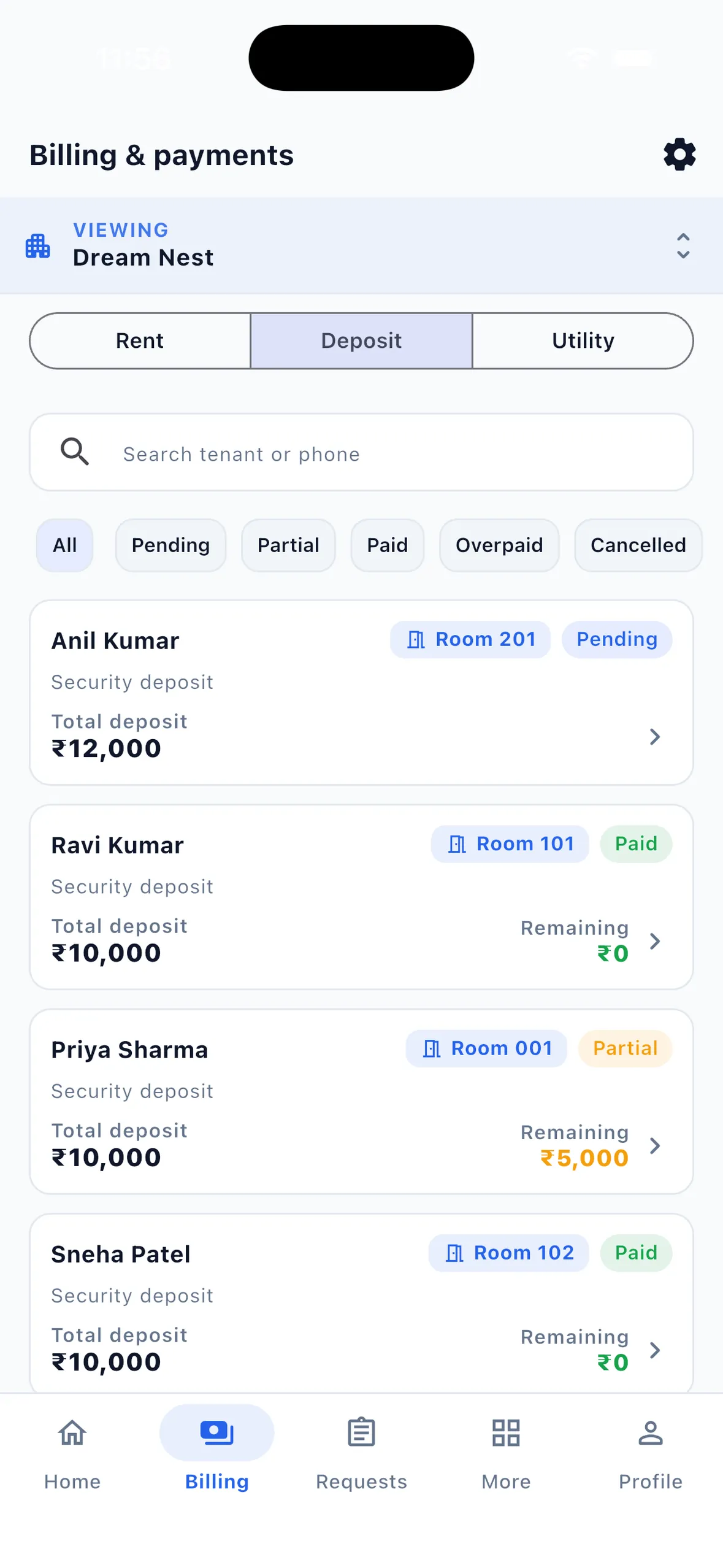
- Create the deposit with the tenant. The add-tenant flow includes a deposit step, and you can mark the amount as collected straight away if the tenant pays on the day.
- Record every payment. Note the method (UPI, cash, bank transfer or other), the UTR or reference and a photo of the proof if you have one. If the tenant pays later, they can submit proof from their own app, and it counts only after you approve it.
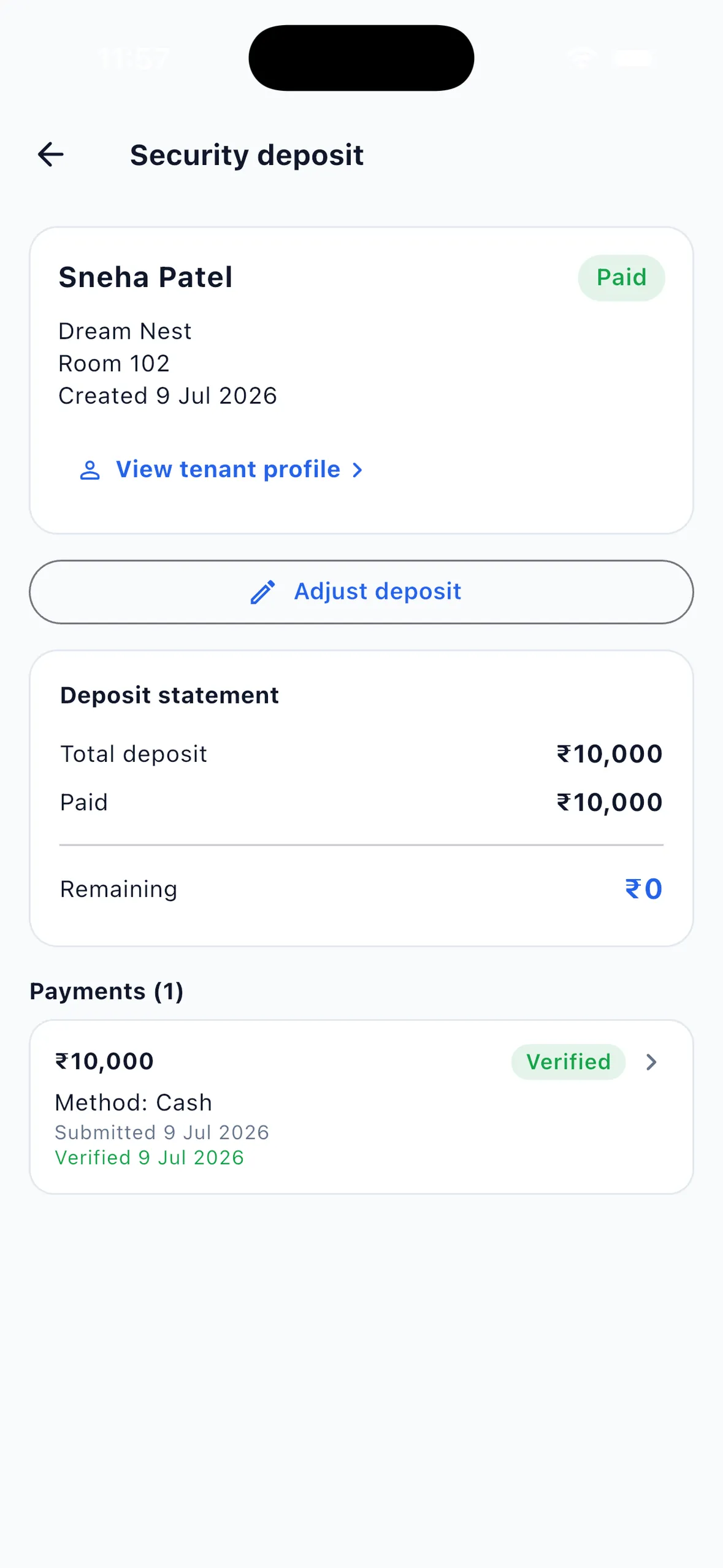
- Check the status. Each deposit shows Pending, Partial or Paid with the remaining amount, so a part-paid deposit stays visible instead of being forgotten.
- Record items you hand over. Keys, a mattress or furniture issued to the tenant can go into the inventory, which matters again at checkout. See tracking keys, furniture and items issued to tenants.
- Use Adjust deposit if the amount changes. If you lower the deposit below what the tenant has already paid, the app asks you to record the refund now or mark it to refund later.
Owners, managers and wardens can manage deposits by default. Accountant, staff and support accounts have no rent or payment access unless the owner switches it on for that person, which keeps cash deposits with the people you have chosen.
What a tenant deposit refund record should show
A checkout record answers four questions in one place: what was held, what is still owed, what was agreed to be deducted and why, and what was returned, when and how. Keep it short and ask the tenant to acknowledge it.
| Checkout item | Where it is recorded | Check |
|---|---|---|
| Deposit held | EasyAavaas deposit record: total, paid, remaining and linked payments | Every deposit payment is verified before move-out |
| Rent and charges still due | EasyAavaas rent records, including electricity and other charges | Move-out stays blocked until rent is settled |
| Items issued to the tenant | EasyAavaas inventory custody records | Each item collected with its condition, or marked lost |
| Room condition | Your own checklist and dated photos | The app does not record a room inspection |
| Agreed deductions | Your written checkout sheet, acknowledged by the tenant, plus a note on the deposit | The app has no deduction lines or reasons |
| Refund paid | EasyAavaas refund record with payment method and note | Recorded at move-out, or marked to refund later |
Checkout step by step
- Confirm the move-out date in writing and check it against the notice period you agreed. Tenants can also raise a vacate or move-out request in the app, which you approve or reject with a note.
- A few days before, review what is pending: unpaid rent and charges, any payment proof waiting for your review and any part-paid deposit.
- Walk through the room with the tenant. Collect keys and other issued items and record each one as returned with its condition, or as lost with a note.
- Write down any deduction the tenant agrees to, with the reason, the amount and how it was worked out. Ask the tenant to sign it or confirm it on WhatsApp.
- Start the move-out in the app. EasyAavaas checks in order: unpaid rent blocks it; uncollected items block it unless the owner acknowledges them; an unpaid deposit balance or a deposit payment awaiting verification blocks it. It then shows the deposit, what was paid and the refund due.
- Record the refund now with the payment method and a note, or choose to refund later. A refund-later deposit keeps showing the refund due until you record it from the deposit page.
- For a room billed as a whole, choose which remaining tenant becomes the room's rent payer. The app then frees the bed, marks the tenant inactive with the move-out date and removes their app access to that property.
- Share the final figures with the tenant and file the acknowledged checkout sheet with your deposit records.
Worked example: deposit, agreed deduction and refund
Example (illustrative name and figures). Rohan moves into a double-sharing room on 1 June at ₹8,000 rent with a ₹16,000 refundable deposit. He pays ₹10,000 by UPI at move-in and ₹6,000 in cash on 10 June. He gives notice and leaves on 30 November. At the walkthrough one cupboard key is missing, and both sides agree that ₹500 covers a replacement lock. November rent and electricity are already paid.
| Step | Date | Amount | Deposit position |
|---|---|---|---|
| Deposit set at move-in | 1 June | ₹16,000 | Paid ₹0, remaining ₹16,000 (Pending) |
| UPI payment recorded with UTR | 1 June | ₹10,000 | Paid ₹10,000, remaining ₹6,000 (Partial) |
| Cash payment recorded | 10 June | ₹6,000 | Paid ₹16,000, remaining ₹0 (Paid) |
| Agreed deduction for the lost cupboard key | 30 November | ₹500 | Written on the checkout sheet; key marked lost in inventory |
| Money returned to Rohan | 30 November | ₹15,500 | ₹16,000 held − ₹500 agreed deduction |
The arithmetic is simple. The record-keeping needs care, because EasyAavaas records the full refund due at move-out and has no deduction field. Pick one of these approaches and use it every time:
- Charge it separately (the records match the money). Before move-out, add the ₹500 to Rohan's rent record as an Other charge assigned to him. When he pays it, record the payment, then refund the full ₹16,000 deposit. If you settle it by paying back ₹15,500, record the ₹500 charge as paid with a note such as "adjusted from deposit" and say the same in the refund note.
- Net it off and explain it. If you simply return ₹15,500 without a separate charge, the app will still record a ₹16,000 refund. Write the deduction, the reason and the ₹15,500 actually paid in the refund note, and keep the acknowledged checkout sheet as the record of the net amount.
Common deposit and checkout mistakes
- Adding deposits to the month's rent collection and then treating the money as spendable income.
- Taking a cash deposit without recording it the same day, or without noting who received it.
- Deciding deductions after the tenant has left, with no walkthrough, photos or written agreement.
- Letting the last month's rent be "adjusted against the deposit" without writing it down. If you agree to this, record the rent as paid with a note saying so, and repeat it in the refund note.
- Promising a refund date you cannot meet. If you will pay later, choose refund later so the amount due stays visible.
- Sharing one owner login, so nobody knows who recorded a cash deposit. Give each manager or warden their own account.
- Copying a deduction rule from another PG. What you may deduct depends on your agreement and the rules that apply to you; take advice from a qualified professional if unsure.
What EasyAavaas records and what stays manual
| Task | In EasyAavaas | Manual or outside the app |
|---|---|---|
| Deposit amount, paid and remaining | Yes: one deposit record per tenant with a status | — |
| Deposit payments and proof | Yes: method, UTR or reference and proof; tenant-submitted proof waits for approval | Matching payments to your bank statement |
| Changing the agreed deposit | Yes: Adjust deposit; lowering it below the amount paid records a refund now or later | — |
| Room inspection and photos | Not recorded | Your checklist and dated photos |
| Deduction amounts and reasons | No deduction lines; a free-text note only | Acknowledged checkout sheet |
| Issued keys and furniture | Yes: inventory custody, collected with condition or marked lost | Walkthrough of shared room items |
| Move-out safeguards | Yes: blocked while rent, issued items or the deposit are unsettled | — |
| Refund | Yes: refund now or refund later, with method and note | Paying the money; EasyAavaas does not transfer funds |
| Deposit report | No separate deposit report; the Tenant Directory export lists each current tenant's deposit | Your own deposit summary, if you need one |
Tenants pay you directly by UPI, cash or bank transfer. EasyAavaas keeps the deposit record, proof and refund history; it does not hold deposits, process payments or reconcile with your bank. If you still keep monthly rent in Excel, the PG rent register template covers rent, and deposits belong on a separate sheet.
PG checkout checklist
- Move-out date and notice confirmed in writing
- All rent and charges paid, with no proof waiting for review
- Deposit fully paid and every deposit payment verified
- Keys and issued items collected, or marked lost with a note
- Room walked through with the tenant and dated photos taken
- Deductions, if any, written with reason and amount and acknowledged by the tenant
- Refund method, date and reference agreed
- Refund recorded in the app, or marked to refund later
- Checkout sheet filed with your deposit records
Questions about PG deposits and checkout
Does EasyAavaas track security deposits?
Yes. Each tenant can have a deposit record with the agreed amount, the amount paid, the remaining balance and a status such as Pending, Partial, Paid or refund due. Each payment keeps its method, reference and proof. Tenants pay you directly; EasyAavaas records the deposit and does not hold the money.
Can I record deductions from a deposit in the app?
Not as separate line items. The deposit has a free-text note, and the move-out step records the full refund due. Keep agreed deductions on a written checkout sheet the tenant acknowledges, or add an agreed charge to the tenant's rent record before move-out so the records match the money that moved.
What stops a tenant being moved out with money still due?
EasyAavaas blocks the move-out while rent is unpaid, while issued items are not collected (the owner can acknowledge uncollected items and continue), and while the deposit has an unpaid balance or a payment awaiting verification. The refund is then recorded straight away or marked to refund later.
Is a security deposit part of my monthly PG income?
A refundable deposit is money held for the tenant, so keep it separate from rent collection in your monthly figures. EasyAavaas keeps deposits in their own tab, apart from rent records. Ask your accountant how deposits and any deductions should appear in your books.
How much can a PG owner deduct from a deposit?
That depends on your written agreement and the rules that apply where your property is, and this guide does not give legal advice. Agree deduction terms in writing at move-in, inspect the room with the tenant at checkout and take professional advice if a dispute arises.
Related guides and tools
- Rent records, reminders and payment proof in EasyAavaas
- Tenant records, documents and move-in details
- Tracking keys, furniture and items issued to tenants
- Free PG rent register template for monthly rent kept in Excel
- PG month-end checklist for reviewing deposits and refunds due each month
- PG tenant onboarding checklist