
Student Hostel Management Software: A Checklist for Owners and Wardens
Separate what student hostel accommodation software should do from the attendance, mess, parent and fee features that usually need a campus or ERP product.
Quick answer
Student hostel management software has two jobs that are often confused: running the accommodation (rooms, beds, occupancy, student records, rent and complaints) and running student administration (attendance, mess, out-passes, parent updates, biometrics and academic fees). EasyAavaas covers the accommodation side for private student hostels and PGs, free forever on Android and iOS. It is not a college ERP. If you need the student-administration features, plan for another system alongside it.
This checklist is for owners of private student hostels, PGs near colleges and coaching centres, and wardens who manage rooms for students. It separates what an accommodation app should do from what usually needs a campus or ERP product, so you do not buy the wrong tool or expect one tool to do everything.
Student occupancy management software: what it should show
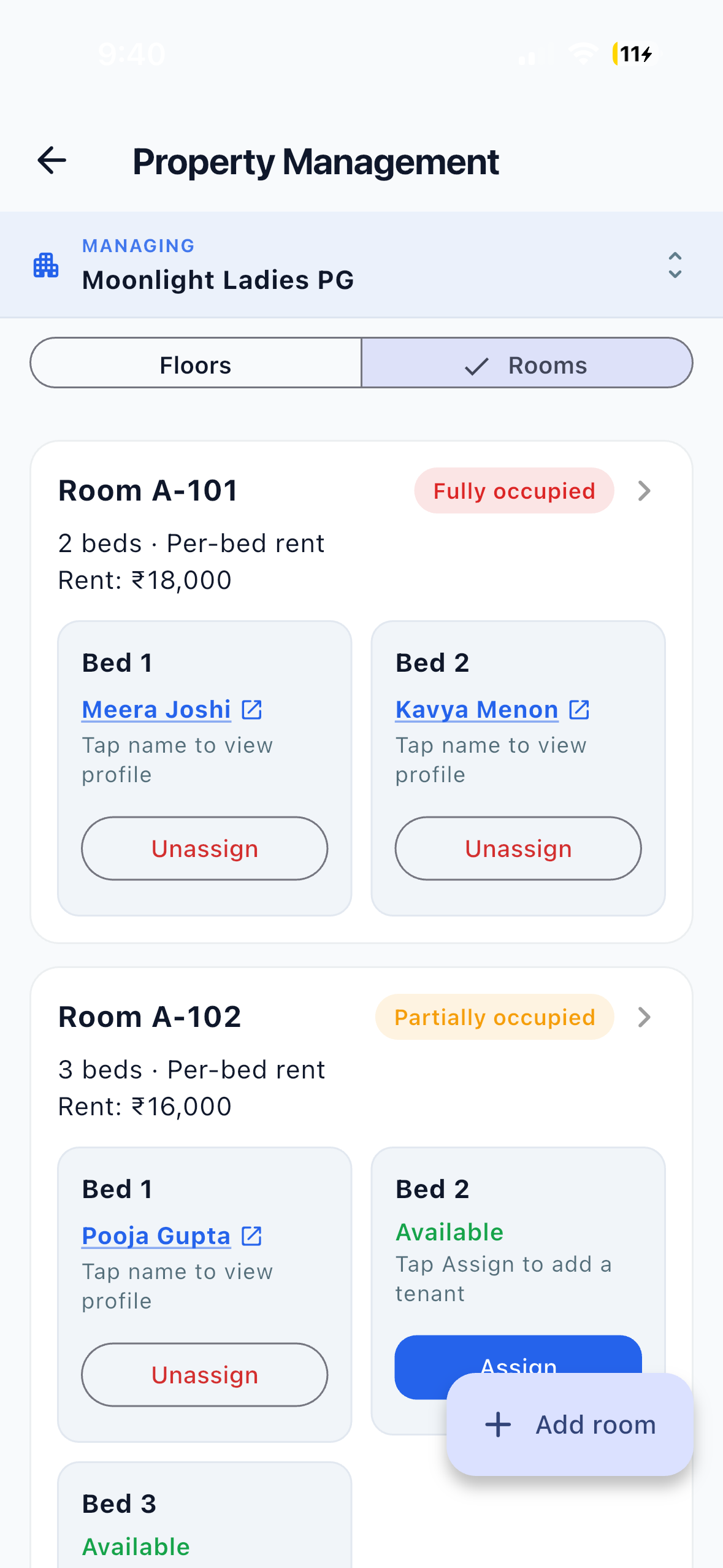
Student occupancy management software should tell you at any moment which beds are filled, which are vacant and which student is in each one. For a student hostel, that means:
- Floors, rooms and individual beds, with single, double, triple and larger sharing.
- Automatic room status: vacant, partly occupied or fully occupied.
- An occupancy rate for the hostel and, if you run several buildings, across all of them.
- Each student’s joining date, bed, monthly rent and status, including students who have asked to move out.
- Rooms you can mark under maintenance without losing their history.
EasyAavaas does this at bed level for each property, with an occupancy rate on the owner dashboard and an “All properties” view for owners with more than one building. One limit to know: you cannot reserve or block a bed for a student who has not arrived yet. See occupancy management software for the full workflow, or work out your vacant beds with the occupancy calculator.
Accommodation operations checklist
These are the day-to-day records a student hostel runs on. Ask every vendor to show each one in the app, not on a slide.
| Check | What to look for | EasyAavaas |
|---|---|---|
| Rooms and beds | Floors, rooms, individual beds and sharing type | Supported |
| Per-bed or per-room rent | Each student pays for a bed, or one payer for the whole room | Supported |
| Student records | Phone, student flag, hometown, food preference, joining date and emergency contacts | Supported |
| Documents | ID, address proof and agreements uploaded and reviewed | Supported: uploaded by the student or staff; the owner or permitted staff mark the profile verified. No Aadhaar, DigiLocker or police verification |
| Monthly rent and reminders | Rent records, automatic reminders, payment proof and verification | Supported: reminders by app and WhatsApp; payments are recorded, not collected |
| Deposits and move-out | Deposit paid, remaining and refunded; checks before a student leaves | Supported: move-out waits until rent, issued items and the deposit are settled |
| Electricity and other charges | Meter readings or units split among a room’s occupants; one-off charges | Supported |
| Complaints | Category, priority, photos, assignment and updates the student can see | Supported |
| Visitors | Guest requests, approval, check-in and check-out | Supported: students register guests; the warden approves and checks them in and out |
| Notices | Hostel-wide notices by app and WhatsApp | Supported: sent to all active members of the property |
| Warden and staff access | Separate logins and permissions for each property | Supported |
| Reports | Occupancy summary, rent ledger and resident list exports | Supported: PDF and Excel, per property |
Student-administration checklist: features that may need another system
These are common in college and school hostels. Ask each vendor for a clear yes or no, and plan a second system for anything your accommodation software does not cover.
| Need | Questions to ask | EasyAavaas |
|---|---|---|
| Night attendance or roll call | Room-wise or floor-wise attendance? Dated history? Who marks it? | Not supported. Use a register or a hostel product with attendance |
| Mess and meals | Menus, meal counts, per-student mess cost, contractor billing? | Not supported. Food preference is stored on the record, and food complaints can be logged |
| Out-passes and leave | Request, approval, expected return time, check at the gate? | Not supported. The visitor module covers guests, not student outings |
| Parent features | Parent app or alerts for attendance, fees or late return? | Not supported. No parent portal |
| Biometrics and access control | Fingerprint or face devices, door access, proxy prevention? | Not supported. No device integration |
| Academic and college fees | Tuition and hostel fee ledger linked to student ID? Fee-linked gate passes? | Not supported. EasyAavaas is not a college ERP |
| Allotment rules | Merit, quota or department-based room allotment? | Not supported. Staff choose the room and bed |
| GST invoices | Tax invoices for each student? | Not supported |
Products built for campuses describe these features on their own sites. On 23 October 2026, OpenEduCat’s hostel page for colleges described mess attendance by biometric, RFID or QR scan, with hostel records “tied into academic records and fee ledgers”. SpaceBasic’s hostel security page described student outpasses checked by QR scan and parent alerts for late returns. HMPL, an Android app for hostel owners, listed night attendance, mess costs and a “Digital out-pass with approval, expected return and automatic parent intimation”. EasyAavaas has not tested these products; confirm current details with each vendor.
If administration is your main problem
If attendance, out-passes, parent updates and fee ledgers are what you most need, an accommodation app will not solve them. Start with a campus or hostel-administration system, and add an accommodation app only if room, rent and complaint records are also hard to manage.
Running an accommodation app alongside a campus system
Many student hostels use two tools. If you do, agree in writing which system is the record for each job:
- Rooms, beds and occupancy: the accommodation app.
- Hostel rent, deposits and complaints: the accommodation app, when students pay the hostel directly.
- Attendance, out-passes, mess and parent updates: the campus or hostel-administration system, or a paper register.
- Academic fees and student IDs: the college ERP or accounts system.
Use the same room and bed labels in both, and record a student’s move-out in both on the same day so the two never disagree about who is staying.
How a private student hostel runs on EasyAavaas
- Create the property as boys, girls or co-ed, then add floors, rooms and beds with the sharing type and per-bed or per-room rent.
- Add students from your phone contacts, up to 25 at once with floor, room, bed, rent, deposit and move-in date, or one at a time. A student can be added before a bed is assigned.
- Ask students to upload ID and address proof in the app, then review and mark each profile verified.
- Monthly rent records are created automatically and reminders go out by app and WhatsApp. Record cash and UPI payments, or verify the proof students upload with the UTR.
- Students raise complaints with photos; the warden assigns, updates and closes them.
- Students register visitors; the warden approves them and checks them in and out.
- At move-out, settle rent, collect issued items such as keys, and settle the deposit or record the refund for later.
For hostel setup, wardens and permissions in more detail, see EasyAavaas hostel management software.
Price
EasyAavaas is free forever for owners, wardens, staff and students: ₹0 per month, no per-bed or per-property fee, no limit on properties or beds, no setup fee and no commission on rent. Students pay the hostel directly; EasyAavaas does not process payments or hold money. To compare free options more widely, use the free hostel management software checklist.
Frequently asked questions
What is student occupancy management software?
It is software that tracks which rooms and beds in a student hostel are filled or vacant and which student is in each bed, usually with an occupancy rate. EasyAavaas does this at bed level, with automatic vacant, partly occupied and fully occupied room status and an occupancy rate on the owner dashboard.
Can EasyAavaas manage a college hostel?
It can manage the accommodation side: rooms, beds, student records, documents, rent records, deposits, complaints, visitors and notices. It is not a college ERP and does not handle attendance, mess, out-passes, parent portals, biometrics or academic fees.
Does EasyAavaas have student attendance or a parent app?
No. EasyAavaas has no attendance, out-pass or parent portal. Hostels that need these can use a campus or hostel-administration system alongside it, or keep a register.
Can students pay hostel rent through EasyAavaas?
Students pay the hostel owner directly by UPI, cash, bank transfer or another method. They can upload payment proof with the UTR in the app for staff to verify, and staff can record cash payments. EasyAavaas does not process payments or hold money.
Is EasyAavaas free for student hostels?
Yes. It is free forever for owners, wardens, staff and students, with no per-bed or per-property fee and no limit on properties or beds.
Can I reserve a bed for a student joining next month?
Not in EasyAavaas. Beds show as vacant or occupied. You can add the student without a room and assign a bed when they arrive, and keep a note of upcoming arrivals until then.
Related reading
- EasyAavaas hostel management software
- Occupancy management software for beds and rooms
- Free hostel management software checklist
- How to track PG and hostel occupancy
- Hostel management software questions
Sources
- OpenEduCat: Hostel management for colleges · read 23 Oct 2026 — Mess attendance by biometric, RFID or QR; links to academic records and fee ledgers
- SpaceBasic: Hostel security software · read 23 Oct 2026 — Outpasses checked by QR scan; parent alerts; biometric access
- HMPL by Vinav Software Solutions · read 23 Oct 2026 — Night attendance, mess costs, digital out-pass with parent intimation; Android app