
Free Co-Living Management App: What a ₹0 Tool Must Still Cover
A free co-living app is only useful if it still handles per-bed rent, resident turnover, shared electricity, notices and building-level access. Here is what to check and where free tools stop.
Updated
Free only helps if the app covers co-living work
A co-living operator needs a free app that keeps working at a high bed count. It should handle per-bed rent in shared rooms, whole-room rent in private rooms, move-ins and move-outs with deposits, electricity split in shared rooms, one notice to every resident and staff access by building. EasyAavaas is free forever with no per-bed or per-property fee. It does not include online booking, so operators who sell rooms online need a booking tool as well.
What “free” has to mean for a co-living property
Many PG and hostel tools charge per bed or per property. That model hurts co-living most. A co-living operator often runs many beds across a few buildings, so every bed adds to the monthly bill.
Illustrative example: a co-living property with 80 beds at ₹30 per bed per month costs ₹2,400 a month, or ₹28,800 a year, in software fees alone. On a plan with no per-bed fee, the same 80 beds cost ₹0 in software fees. Check any price against your real bed count, not the lowest tier shown on a sales page.
A free plan should also mean no setup or onboarding fee, no commission on rent and no cap on beds, rooms or properties, so adding a building does not move you to a new tier. Rent reminders, overdue messages, notices and complaint updates are sent on WhatsApp at no cost to the owner on EasyAavaas.
Free software does not mean the software handles your money. Residents pay you directly by UPI, cash, bank transfer or another agreed method. EasyAavaas records the payment and the tenant's proof, charges no payment fee and does not hold or move money. Any charges from your bank or payment app are set by them.
Five co-living jobs a free app must still do well
A free plan is worth choosing only if it covers these five jobs. Test each one with a real room before you move a whole building.
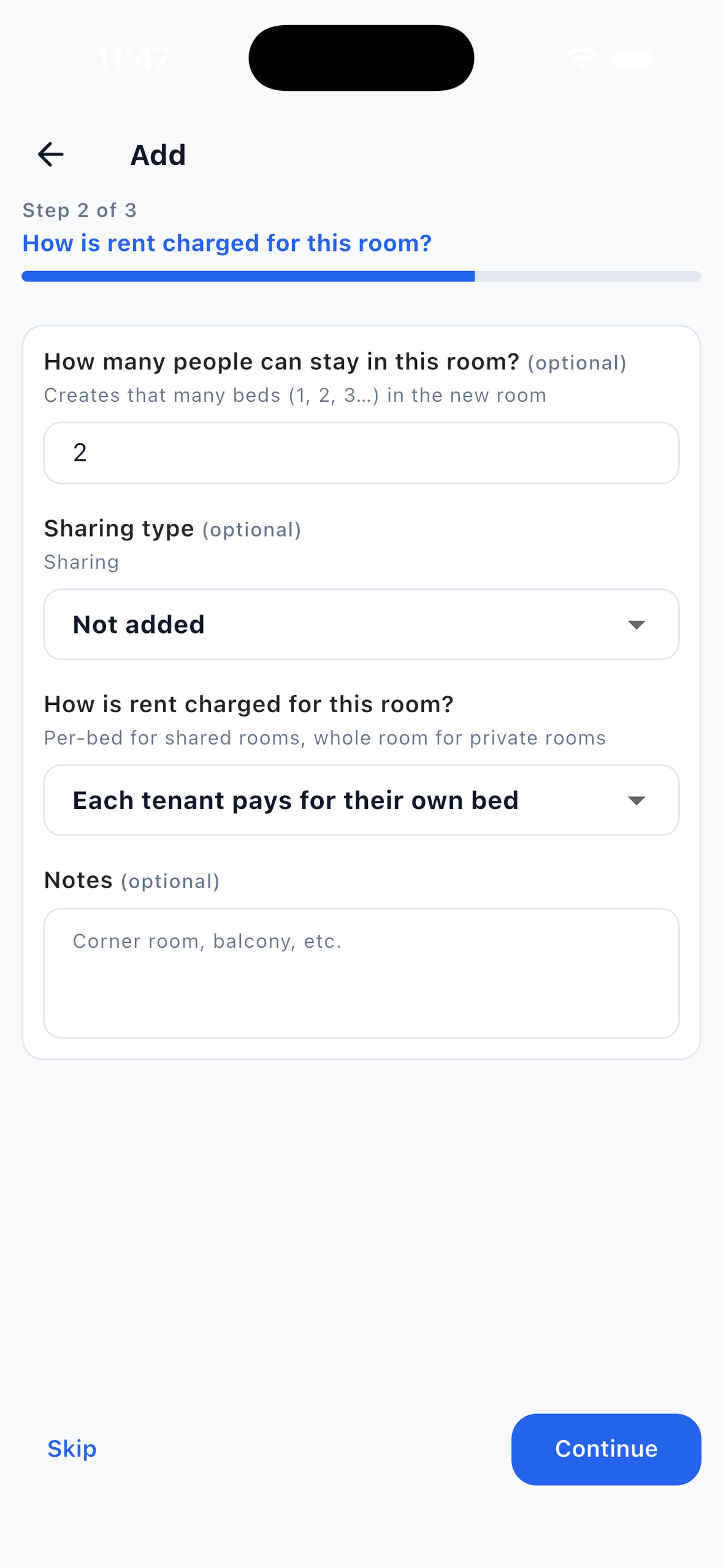
- Per-bed billing in shared rooms and whole-room billing in private rooms. A shared room can be four separate rent accounts, while a private room may be paid by one person. The app should hold both models in one property and show the vacancy status of each bed.
- Move-ins, room changes and move-outs with deposits. Turnover is high, so each resident needs a dated record of room, rent, deposit and any balance still owed. A move-out should not finish while rent is unsettled or issued items are still out.
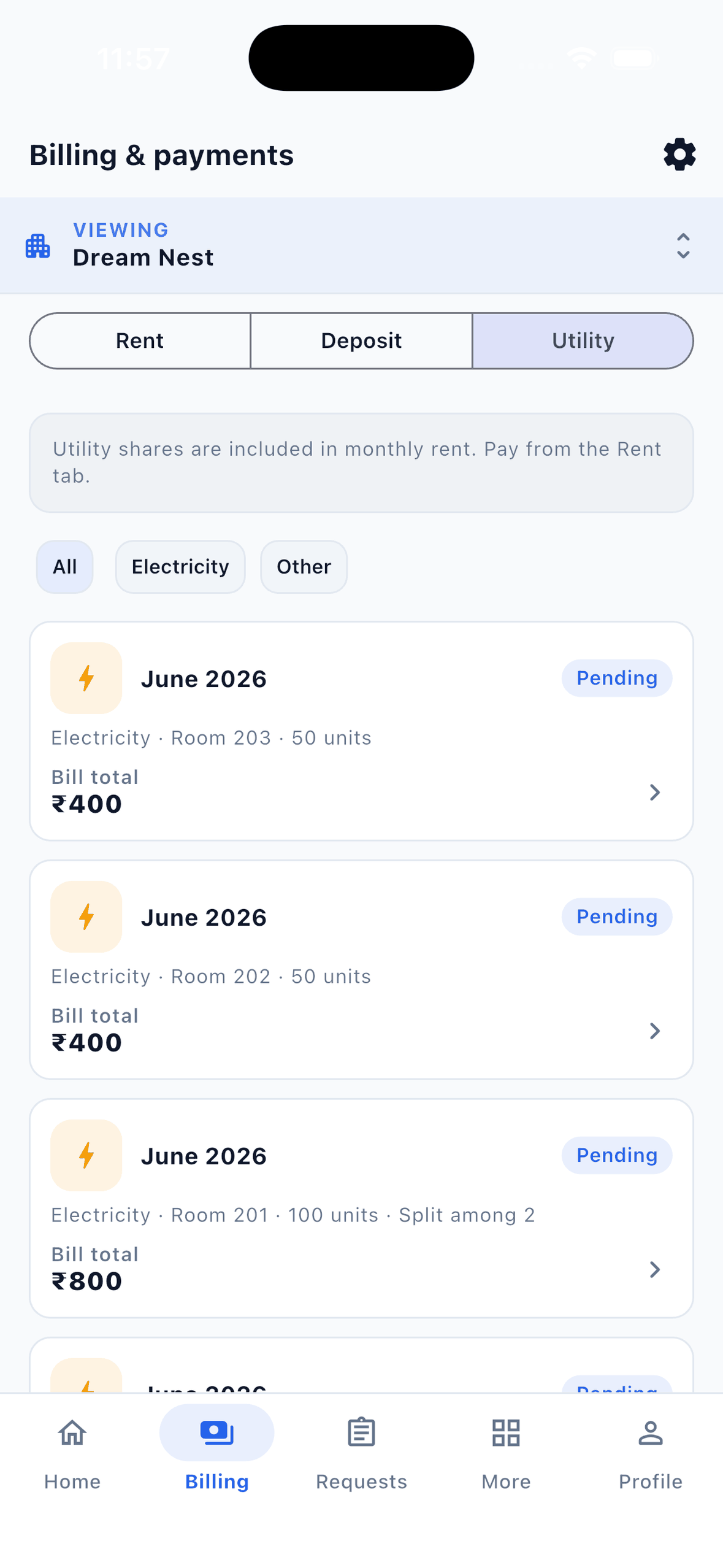
- Splitting electricity in shared rooms. A shared room needs a written rule: units or meter readings multiplied by your rate, then split equally among the room's occupants or assigned to one resident. The residents should see the amount added to their monthly record.
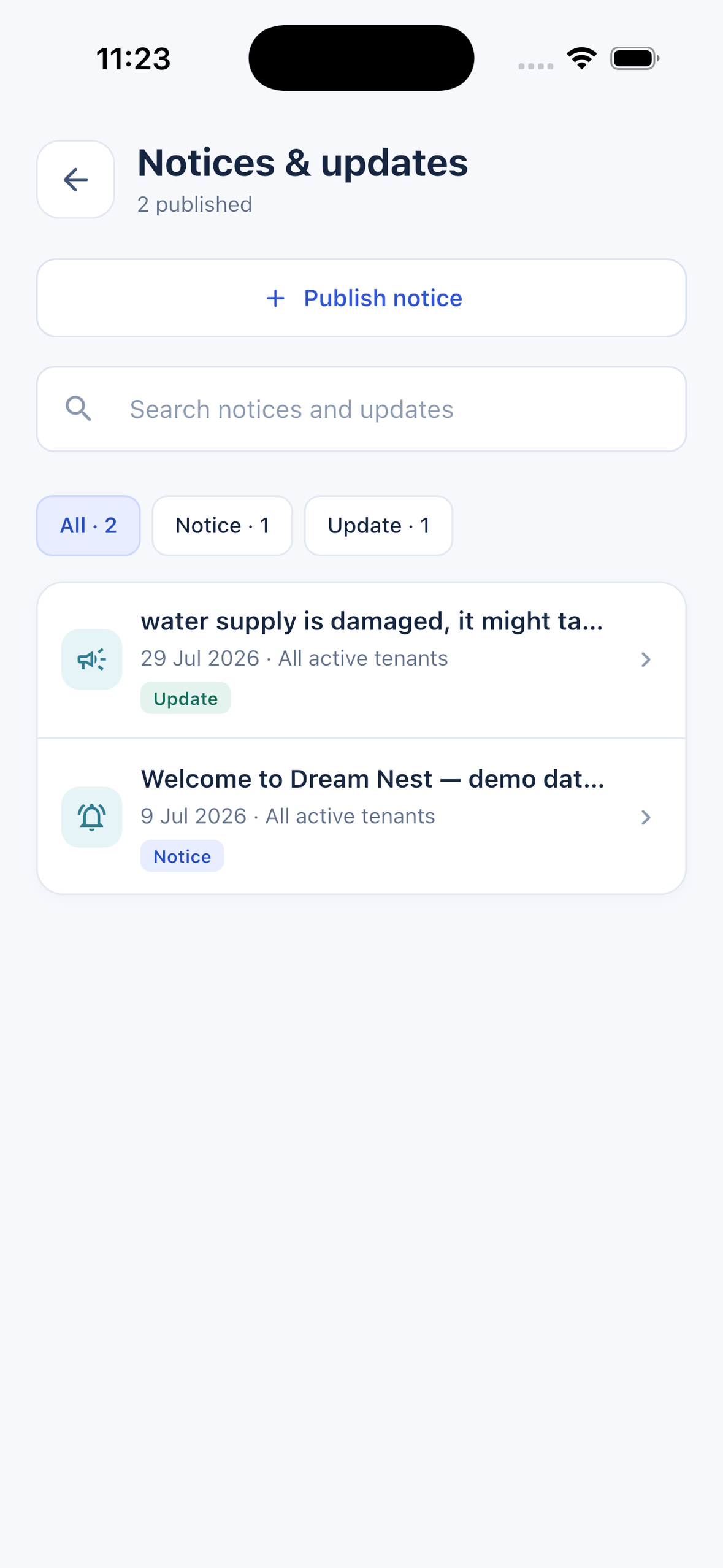
- One notice to every resident. Water work, a power cut or a new house rule reaches a whole building at once. One notice should reach every active member of that property, not depend on someone copying the same message into several chats.
- Manager access per building. A site manager needs their own building's residents, rent and complaints. The owner needs all buildings. Roles and per-person permissions should decide who can see rent and payment figures.
How EasyAavaas covers each job at ₹0
EasyAavaas is free forever for owners, managers, staff and tenants, on Android, iOS and the owner web portal at owner.easyaavaas.com. The plan has no limit on properties, floors, rooms, beds or tenants. Owners and team members can also use the portal to work with the same records. Owners report 150+ properties and 2,000+ beds managed on the platform (owner-reported, 17 November 2026). Full inclusions are on the pricing page.
- Billing models. Each room is set to per-bed or whole-room billing when you add it, and each resident gets a monthly rent record. Limit: beds cannot be reserved in advance, so add a resident when they confirm.
- Turnover. Add a resident with rent, joining date, deposit, documents and emergency contact. Room-change requests come to you for approval. Move-out is blocked until rent is settled, issued items are returned and the deposit is settled or marked for later refund. Limit: charges are not prorated by days stayed, so a mid-month joiner needs a rule you apply yourself.
- Electricity. Enter units or meter readings and your per-unit rate, then split the bill equally or assign it to one resident. The amount is added to that month's record. Late fees are suggested by the app and never applied automatically.
- Notices. Publish a notice to a property's active members, or send one notice to all of your properties at once.
- Access by building. Add each team member only to the properties they work in. Managers and wardens get operational access by default; accountant and support roles start narrower. You can change permissions per person. Several buildings can sit under one account, as described on the multi-property page.
The WhatsApp assistant is also included at no charge, but the EasyAavaas team has to activate it for your account first. Ask on WhatsApp at +91 78787 65818. Each conversation allows 40 assistant turns a day before a person takes over, and every change made through the assistant needs a tap on a confirmation card.
Where a free app stops: online booking and channel sales
EasyAavaas does not include online booking, a payment gateway or distribution to online travel agents. If residents book and pay online, if you list rooms on booking channels or if you sign contracts at volume, a PG and co-living operations app will not replace those tools. Compare the booking-led options in the best co-living management software guide before you decide. If you run both kinds of tool, choose one system as the record for rent and occupancy so the two never disagree.
Build the rest of the stack around the app
A free operations app does not replace every tool a co-living operator uses. Plan for these alongside it:
- UPI apps and your bank account for receiving rent. EasyAavaas records the payment and the tenant's proof, with the screenshot and UTR, but it does not reconcile with your bank statement. Check the statement yourself.
- A spreadsheet or your accountant's software for bank reconciliation, profit-and-loss accounting and GST invoicing. These are not included. The property expense records in EasyAavaas are not a profit-and-loss statement.
- Rent receipts from a template or your own document. The app does not generate rent receipts, so keep the amount and date identical to the payment record.
- Bulk resident entry. There is no Excel import. Add up to 25 tenants at once from phone contacts, then complete each record in the app.
- Attendance, meal plans, biometrics and offline use are outside the app. Keep those in your current tools if you run them.
Start with one building
Set up one room and one resident first, then repeat the same structure across the building. The co-living setup guide walks through that sequence, so it is not repeated here. For the electricity rule, read the electricity and extra charges guide, and check a split with the PG electricity bill calculator before you charge residents. To see the product for co-living operators, go to the co-living management software page.
Is a free co-living app really ₹0 for a large building?
On EasyAavaas, yes. The plan has no per-bed or per-property fee, no setup fee and no limit on beds, rooms or properties. Charges from your bank or payment app are separate and set by them.
Does EasyAavaas take a share of rent?
No. There is no commission on rent and no payment fee. Residents pay you directly, and EasyAavaas does not hold or move the money.
Can I run shared rooms and private rooms in the same property?
Yes. Set each room to per-bed or whole-room billing. Shared-room beds get their own rent records, and a private room can have one rent payer.
Does the free app include online booking?
No. EasyAavaas does not include online booking, a payment gateway or channel distribution. Operators who take bookings online should compare booking-led platforms.
Is the WhatsApp assistant free?
It is included at no charge, but the EasyAavaas team must activate it for your account first. Request activation on WhatsApp at +91 78787 65818.