
PG Electricity Bill Management: Splitting and Recording Extra Charges
Enter electricity from meter readings or units, add flat maintenance-type charges and explain each one to tenants. Two worked examples and what happens outside the app.
Short answer
For PG electricity bill management, EasyAavaas lets an owner, manager or warden enter a room's electricity from units consumed or from previous and current meter readings, multiplied by your per-unit rate, and split it equally among the room's occupants or assign it to one tenant. Flat extras such as a maintenance or food charge go in as an Other bill. Each share is added to that tenant's rent record for the month, and the tenant is notified. There is no smart-meter connection and no tariff calculation: the rate is the one you enter.
Electricity and other extra charges cause more PG disputes than rent itself, because tenants cannot see how the figure was reached. This guide covers PG electricity bill management end to end: how to split an electricity bill in a PG or hostel room, how to add maintenance and other flat charges to monthly billing, and how to explain each charge so it is accepted the first time. It includes a meter-based example and a flat-fee example, and says clearly which calculations happen outside the app.
Decide your charge rules before the first bill
- Write down which charges are included in rent and which are billed separately. Common extras are room electricity, a monthly maintenance or housekeeping charge, and food where it is optional.
- Agree the per-unit electricity rate and how a shared room's bill is divided. Put it in the agreement or house rules and explain it at move-in.
- Decide what happens when someone joins or leaves mid-month. EasyAavaas does not prorate charges by days stayed, so this is a rule you apply yourself.
- Decide on a late fee, if any. A late-fee rule (a fixed amount, an amount per day after the grace period, or a percentage of base rent) can be set in property settings. It is never added automatically: the app suggests the fee and you confirm or edit it.
- If a charge is the same for every tenant every month, consider including it in the rent. One amount is easier to explain than a list of small extras.
How to split an electricity bill in a PG room
- Read the room meter on the same day each month. Note the reading and date, and photograph the meter for your own file.
- Open the room or the tenant's details and choose Add utility bill. Pick Electricity as the bill type and choose the billing month whose rent statement should carry the charge.
- Under how to enter consumption, choose Meter reading (previous and current) or Enter units. The previous reading and your per-unit rate are pre-filled from the last electricity bill, so check them before saving.
- Under who pays, choose Split equally among the room's current occupants, or One tenant.
- Check the estimated amount, add a due date and a short note if useful (for example, the reading dates), and save.
- Each tenant's share is added to their rent record for that month, so the statement shows base rent plus utilities and the tenant pays one total through the normal rent flow. The tenant is notified when the share is added.
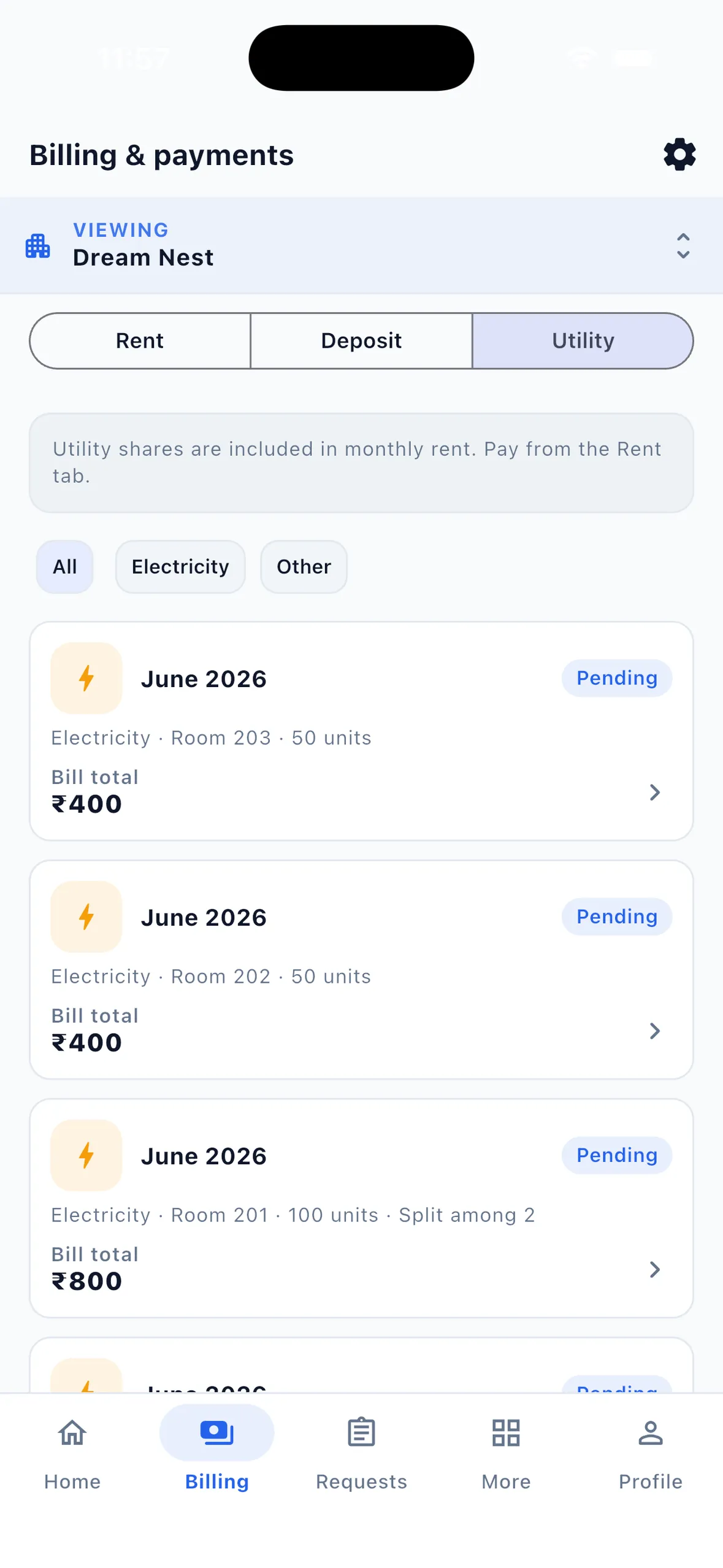
Owners, managers and wardens can add utility bills by default. Bills belong to one room or one tenant, so there is no single property-wide bill; a charge that applies to everyone means one entry per room.
Worked example 1: a meter-based electricity bill
Example (illustrative figures). Room 203 is a triple-sharing room with its own sub-meter. The agreed rate is ₹9 per unit, and October's electricity is billed with November's rent.
| Item | Value | How it is worked out |
|---|---|---|
| Previous reading (1 October) | 4,520 | Pre-filled from last month's bill |
| Current reading (1 November) | 4,640 | Read from the meter |
| Units consumed | 120 | 4,640 − 4,520 |
| Bill total | ₹1,080 | 120 units × ₹9 |
| Share per tenant | ₹360 | ₹1,080 ÷ 3 occupants, split equally |
In EasyAavaas you enter the two readings and the rate, choose Split equally and November as the billing month, and the app works out the total and each share. Each tenant's November rent record then shows ₹360 of electricity on top of rent.
When the split is not equal
If one tenant moved in on 16 October, an equal split overcharges them. Work out the shares outside the app first — for example by days stayed: 31 + 31 + 16 = 78 tenant-days, giving ₹429, ₹429 and ₹222 after rounding. The PG electricity bill calculator does this in your browser. Then add each share as an Other bill with a flat amount, assigned to that tenant, with a note saying it is October electricity.
Worked example 2: a flat monthly maintenance charge
Example (illustrative figures). An owner charges ₹300 a month per tenant for housekeeping and common-area maintenance, billed separately from rent. Hostel maintenance charges like this work the same way. Room 105 is double sharing.
| Item | Value |
|---|---|
| Bill type | Other (flat amount) |
| Amount entered for Room 105 | ₹600 |
| Who pays | Split equally between 2 occupants |
| Added to each tenant's rent record | ₹300 |
| Note on the bill | Housekeeping and common-area maintenance, November |
Use the same Other bill for water, Wi-Fi, gas, food or a one-off charge: Electricity and Other are the two bill types you can create. If the charge never changes, including it in the rent is simpler; if it varies by room or is optional, a separate Other bill keeps it visible.
Explain each charge to tenants
A charge is accepted faster when the tenant can check it. Send the working, not just the total. The rent statement already shows rent and utilities together; add the readings and rate in a message or a property notice.
- For electricity: meter readings with dates, units, rate and how the room total was split.
- For a flat charge: what it covers, the amount per tenant and the month.
- For a rate change: give notice before the billing month starts, for example with a property notice to all tenants.
- Keep meter photos for a few months in case a tenant questions a reading.
Example message: "Room 203 electricity for October: 4,520 to 4,640 = 120 units × ₹9 = ₹1,080, split among 3 = ₹360 each. It is added to your November rent statement. Meter photo available on request."
Because the share sits on the rent record, the normal rent reminders and payment flow apply to the combined amount. Tenants and staff can also ask for a rent breakdown in chat through the EasyAavaas WhatsApp assistant, which is included free after your account is activated — message the EasyAavaas team on WhatsApp (+91 78787 65818) to request access.
What a PG extra charges app does and what stays outside it
| Step | In EasyAavaas | Outside the app |
|---|---|---|
| Reading the meter | No meter or smart-meter connection | Read and photograph the meter yourself |
| Per-unit rate | You enter it; the last rate is pre-filled | Decide the rate and check it against your own bill and agreement |
| Units and bill total | Calculated from readings or units × rate | — |
| Equal split in a room | Split equally among current occupants | — |
| Unequal or part-month split | Add each share as a charge assigned to one tenant | Work out the shares, for example with the electricity calculator |
| Flat extras: maintenance, water, Wi-Fi, food, one-off | Other bill with a flat amount | — |
| Late fee | Suggested from your property rule; you confirm or edit it | Deciding whether to apply it |
| Showing the charge | Added to the tenant's rent record; tenant notified | Sharing the readings and working |
| Collecting the money | Records payments and proof | Tenants pay you directly by UPI, cash or bank transfer |
EasyAavaas does not apply electricity board tariff slabs or check that your rate follows them. Check what your electricity provider and local rules allow before setting the rate you charge tenants.
Common mistakes with PG electricity and extra charges
- Charging a per-unit rate different from the one you told tenants, or changing it without notice.
- Splitting a room's bill equally when one tenant joined mid-month.
- Reading meters on different days each month, so units are not comparable.
- Adding a charge without a note, then forgetting what it was for.
- Applying late fees inconsistently. Use your written rule the same way for everyone; the app adds a late fee only when you confirm it.
- Mixing deposits with monthly charges. Keep deposits in their own record; see PG deposit and checkout records.
Questions about PG electricity and extra charges
Can EasyAavaas calculate electricity from meter readings?
Yes. Enter the previous and current readings, or the units consumed, and your per-unit rate. The app calculates the bill and splits it equally among the room's occupants or assigns it to one tenant. It does not read meters automatically or connect to smart meters.
Does the electricity charge go on the rent bill?
Yes. Each tenant's share is added to their rent record for the billing month you choose, so the statement shows rent plus utilities and the tenant pays one total. The tenant is notified when the share is added.
How do I split electricity when a tenant moved in mid-month?
EasyAavaas does not prorate by days stayed. Work out each share outside the app, for example with the free PG electricity bill calculator, then add each share as a flat charge assigned to that tenant with a note.
Can I add maintenance, Wi-Fi or food charges?
Yes, as an Other bill with a flat amount, split equally in a room or assigned to one tenant. Electricity and Other are the two bill types you can create.
Does EasyAavaas follow electricity board tariffs?
No. The app uses the per-unit rate you enter and does not apply tariff slabs or check compliance. Check what your electricity provider and local rules allow before setting the rate you charge tenants.
Related guides and tools
- Rent records, reminders and payment proof, where electricity shares appear
- WhatsApp assistant for PG owners and tenants for dues and rent breakdowns in chat
- PG electricity bill calculator for equal or part-month shares
- PG month-end checklist to confirm every room's charges are entered
- How to send a notice to all PG tenants when a rate changes