

PG Inventory Management: Keys, Furniture and Items Issued to Tenants
Record keys, a mattress and room furniture at move-in, collect them at move-out, and know which checks stay on paper.
Short answer
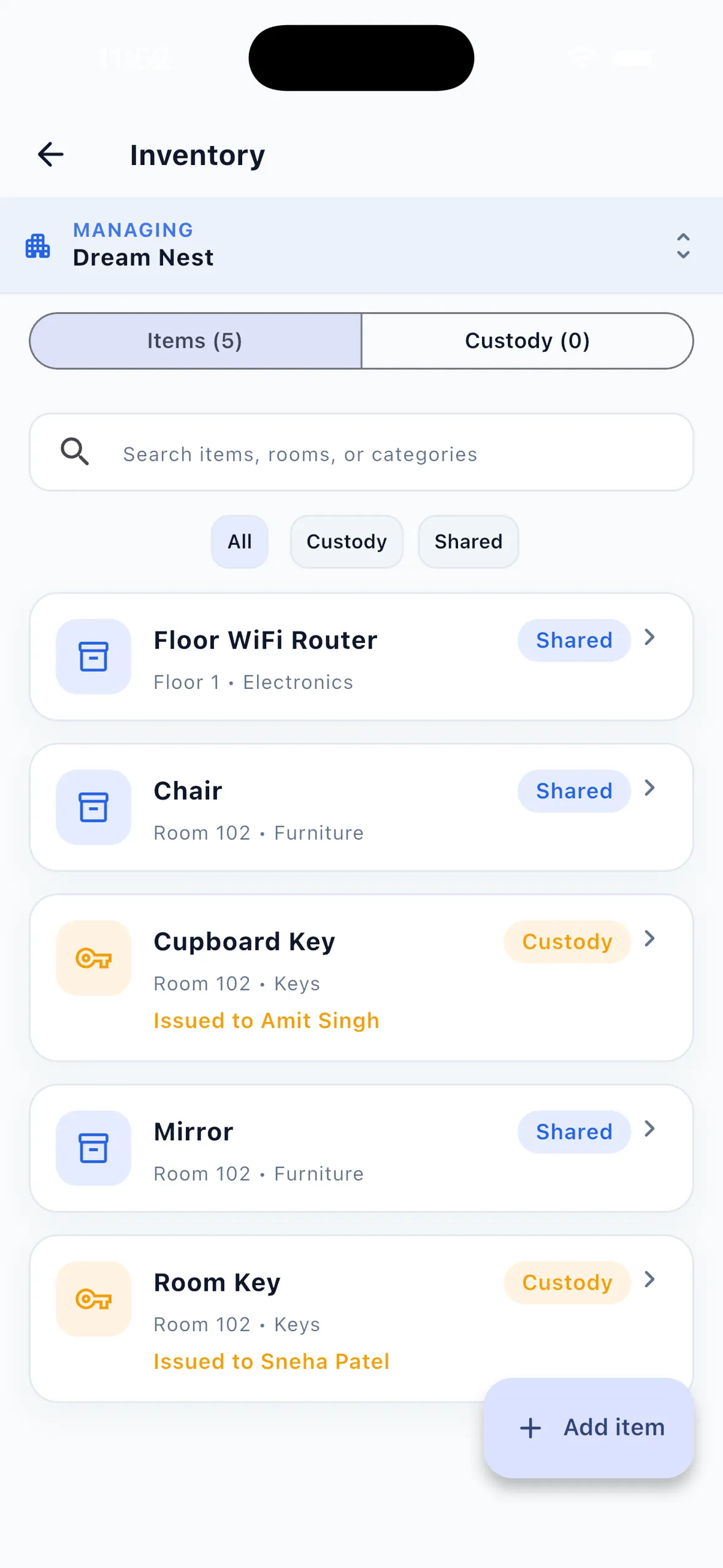
PG inventory management in EasyAavaas covers two kinds of item. Shared items, such as a room's chair or a floor's Wi-Fi router, are counted assets with a location and condition. Custody items, such as room and cupboard keys, are issued to one tenant and must be collected when the tenant changes room or leaves, depending on the rule you set; move-out is blocked until they are returned or marked lost, unless the owner acknowledges them. There is no barcode scanning, depreciation or purchasing module.
Lost keys, a missing mattress or a broken chair are small amounts on their own, but they become arguments at checkout when nobody recorded what the tenant received. This guide shows how a PG, hostel or co-living owner can handle PG inventory management with a simple asset register for rooms and a record of items issued to each tenant, with a worked example from move-in to return.
Shared items and items issued to a tenant
| Tracking type | Use it for | Example items |
|---|---|---|
| Shared | Things that stay with a room, a floor or the property, whoever lives there | Bed frame, study table, chair, mirror, floor Wi-Fi router, washing machine |
| Custody | Things handed to one tenant that you expect back | Room key, cupboard key, main gate key, a mattress or linen set if you issue one per tenant |
Each item records a name, where it belongs (property, floor or room) and a category: furniture, appliances, electronics, kitchen, linen, bathroom, cleaning, electrical, keys or other. Optional details are quantity, unit, serial number, condition (New, Excellent, Good, Fair, Poor or Broken), purchase date, purchase value, current value and notes. Current value is a figure you type in; the app does not calculate depreciation.
Record items at move-in, step by step
- Add each room's shared items once. Open Inventory, choose Add item, pick where it belongs, then select a common item or type a custom name and set its condition.
- Add custody items such as the room key and cupboard key with Tracking set to Custody, and choose Collect when: On room change for anything tied to the room, or On property leave for things the tenant keeps if they move rooms, such as a main gate key.
- On move-in day, use Issue to tenant for each custody item, with an issue note such as "2 keys on ring tagged 203".
- The tenant is notified when an item is issued to them, and the item's activity log records the date.
- Outside the app, walk through the room with the tenant, take dated photos of the furniture and mattress, and note existing damage on your checklist. Ask the tenant to acknowledge it.
Owners, managers and wardens can manage inventory by default; the owner can adjust permissions for individual members.
Worked example: keys, mattress and furniture from move-in to return
Example (illustrative name and items). Neha moves into Room 203, a double room, on 1 July and leaves the property on 31 December. The owner issues a mattress to each tenant and expects it back at checkout.
| Item | Tracking and rule | At move-in (1 July) | At return (31 December) |
|---|---|---|---|
| Room key | Custody · collect on room change | Issued to Neha | Collected, condition Good |
| Main gate key | Custody · collect on property leave | Issued to Neha | Collected, condition Good |
| Cupboard key | Custody · collect on room change | Issued to Neha | Not returned: marked Lost with a note |
| Mattress | Custody · collect on property leave | Issued; item condition Excellent | Collected, condition Fair, stain noted |
| Study table and chair | Shared · Room 203 | Condition Good, photographed | Checked on walkthrough: Good |
| Mirror | Shared · Room 203 | Condition Good, photographed | Checked on walkthrough: cracked, noted on checklist |
When Neha leaves, EasyAavaas lists every custody item still with her and will not complete the move-out until each is collected or marked lost; only the owner can acknowledge uncollected items and continue. Had she moved to another room instead, only the room key and cupboard key would have to be collected. Shared items are not part of that check, so the cracked mirror is caught only by the walkthrough. Whether the lost key or the mirror is charged to the tenant depends on your agreement; see PG deposit and checkout records for how to record an agreed deduction.
Collect items at move-out or room change
- Before the move-out or room-change date, check which items are still in the tenant's custody.
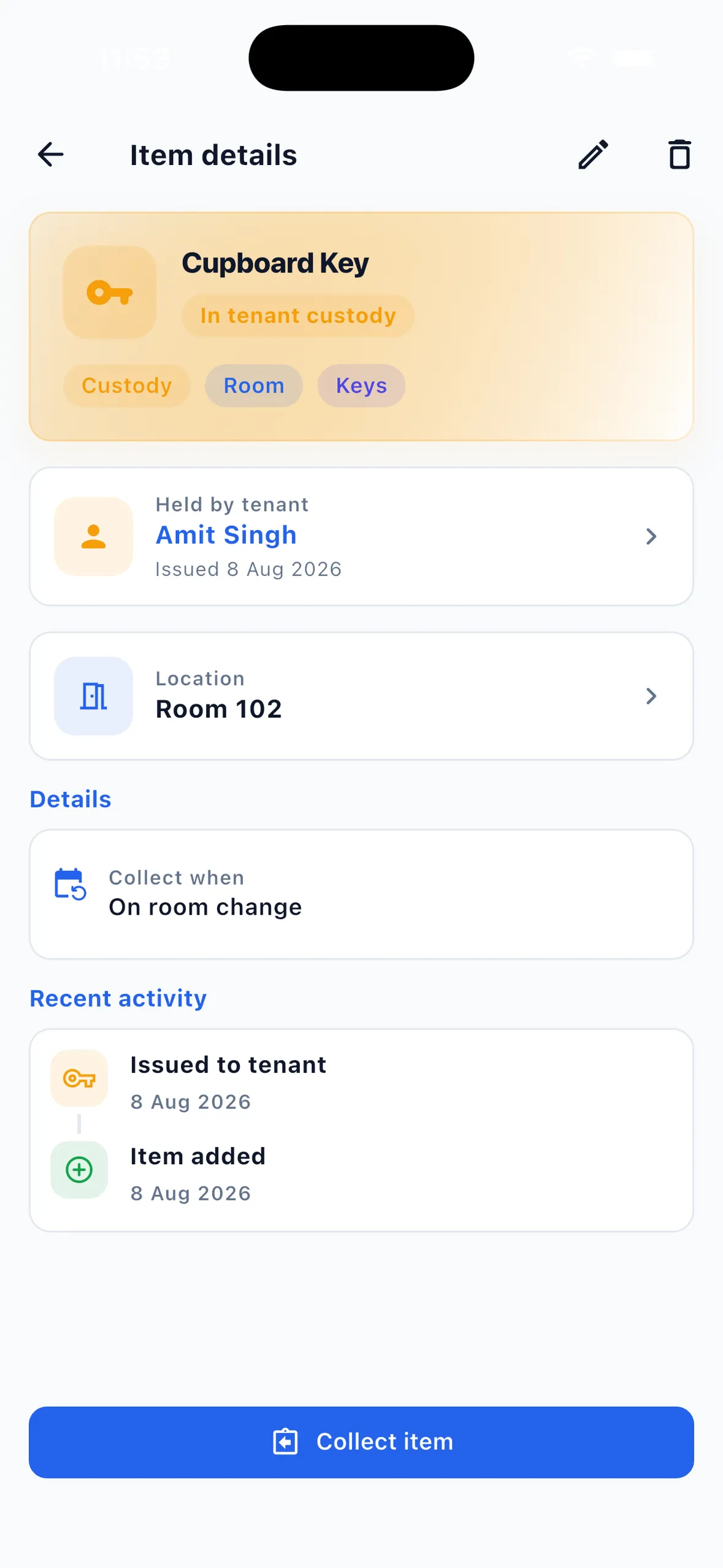
- At the walkthrough, use Collect item for each one and record the condition on return and a return note.
- If an item is missing, mark it Lost with a note. The item's activity log keeps the full history, and the tenant is notified when an item is returned.
- Check shared items against your move-in photos. The app does not inspect the room for you.
- Record any charge you and the tenant agree for a lost or damaged item separately from the inventory, as the deposit and checkout guide describes.
Tenant inventory checklist for what the app does not cover
Keep a printed or spreadsheet checklist alongside the app for the parts EasyAavaas does not record. The free PG inventory register is a downloadable format you can use for this.
- Dated photos of the room, furniture, mattress and fittings at move-in and move-out
- Fixtures not tracked as items: walls, doors, windows, taps, switches, lights and fans
- The tenant's signature or WhatsApp acknowledgement of the move-in condition
- Meter readings on move-in and move-out day, if the room has a sub-meter
- Agreed charges for missing or damaged items, with the reason and amount
- Purchase bills and warranty cards: the app keeps purchase date and value, not the documents
Common mistakes with PG furniture tracking
- Handing out keys without recording them, then not knowing which tenant has the spare.
- Trying to track every bucket and spoon. Start with keys, mattresses and furniture that cost money to replace.
- Setting room keys to On property leave, so they are not collected when a tenant changes room.
- Skipping move-in photos, then arguing about damage at checkout.
- Using the owner override to finish a move-out without writing down what is missing.
- Expecting the app to calculate depreciation or reorder stock. It records the values you enter; purchasing and accounts stay outside.
What EasyAavaas inventory supports and what stays manual
| Task | In EasyAavaas | Manual or outside the app |
|---|---|---|
| Asset register by room, floor or property | Yes: name, category, quantity, unit, serial number, condition, values and notes | — |
| Items issued to a tenant | Yes: issue with a note, collect with condition, or mark lost; activity log | Tenant acknowledgement of condition |
| Move-out and room-change check | Yes: blocked until custody items are collected, unless the owner acknowledges them | Walkthrough of shared items and fixtures |
| Photos of items or the room | Not recorded on inventory items | Dated photos in your own files |
| Barcode or QR scanning | No | Labels or tags if you want them |
| Depreciation and asset accounting | No; current value is typed in | Your accountant |
| Purchasing and stock reorders | No | Your supplier records |
| Charges for lost or damaged items | Not linked to inventory | Agree in writing; see the deposit guide |
Questions about PG inventory and tenant items
Can EasyAavaas track keys issued to tenants?
Yes. Add the key as a custody item, issue it to the tenant with a note and choose whether it is collected on room change or when the tenant leaves the property. The item shows who holds it and when it was issued.
Will the app stop a move-out if the tenant still has a key?
Yes. Move-out and room change are blocked until the relevant custody items are collected or marked lost. Only the owner can acknowledge uncollected items and let the move continue.
Can I keep a hostel asset register in the app?
Yes, for furniture, appliances, electronics, linen, keys and other items, recorded by property, floor or room with quantity, condition, serial number and values you enter. It does not scan barcodes, calculate depreciation or handle purchasing.
Who can manage inventory in EasyAavaas?
Owners, managers and wardens by default. The owner can change permissions for individual members of the team.
Is there a printable tenant inventory checklist?
Yes. EasyAavaas publishes a free PG inventory register you can download and use alongside the app for walkthroughs, room photos and tenant acknowledgements.
Related guides and tools
- Tenant management software for move-in details, documents and deposits
- PG deposit and checkout records
- Free PG inventory register
- PG maintenance checklist for damaged items that need repair
- PG tenant onboarding checklist