

PG Month-End Checklist: Rent, Proofs, Deposits and Open Issues
An operational closing routine for PG owners: check recorded payments, proofs, pending rent, deposits, charges and open issues, then export the month's reports.
Short answer
A PG month-end checklist is an operational close, not accounting. In EasyAavaas, work through six checks: recorded payments, payment proofs waiting for review, pending and overdue rent, deposits and refunds due, the month's electricity and other charges, and unresolved complaints, requests and items. Then export the Property Summary and Rent Ledger for the month. Matching those records to your bank statement or cash in hand stays a manual step.
Owners often search for a hostel monthly reconciliation or PG monthly accounting checklist when what they need first is a reliable close of the month's operations: who has paid, what is still owed and what needs a decision. This PG month-end checklist covers that operational closing for a PG, hostel or co-living property. It does not replace bookkeeping, tax work or a bank reconciliation, and it shows where those manual steps fit.
Before you start
- Pick a fixed closing day each month, after the rent due date and grace period have passed, and keep to it.
- Work property by property. Reports cover one property at a time, although the home dashboard can show all your properties together.
- Make sure everyone who records cash uses their own login, so the Rent Ledger's Collected By column means something.
- Keep your bank or UPI statement and any cash book to hand for the manual matching step.
The PG month-end checklist, step by step
1. Recorded payments
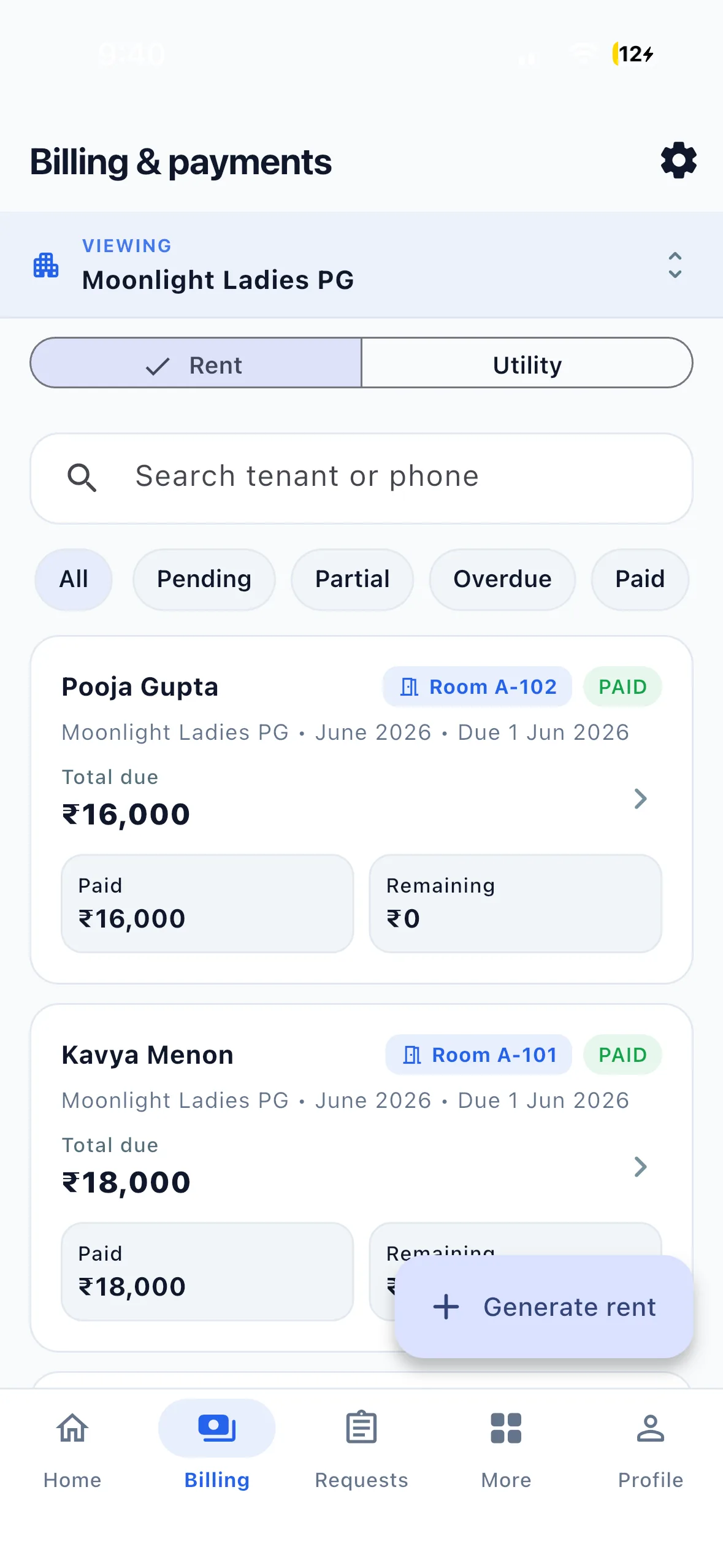
Open Billing and filter the month's rent records by Paid, Partial, Pending and Overdue. Each record shows total due, paid and remaining. Check that every payment received this month has been recorded with its method (UPI, cash, bank transfer or another method) and a UTR or note where you have one. Payments recorded by the owner or staff count as verified straight away and are marked as manual entries.
2. Payment proofs waiting for review
A tenant's payment screenshot is a claim, not a confirmed payment. Open the pending payment requests and approve each proof only after you have checked the money arrived; you can change the approved amount or reject it with a reason. Until it is approved, the rent stays pending. In the All properties view, the home dashboard shows payments waiting to be verified.
3. Pending and overdue rent
List every tenant with a remaining balance and decide the next step for each: a call, a reminder or an agreed date. By default EasyAavaas has already sent one automatic reminder three days before the due date and one overdue message after the grace period, and it does not keep repeating them, so later follow-up is yours. Use Send rent reminder on the tenant profile for a manual nudge, and note any date the tenant agrees.
4. Deposits and refunds due
Open the Deposit tab. Check deposits still Pending or Partial for new tenants, and any showing a refund due for tenants who have left, and record refunds you have paid. Deposits are not part of the monthly rent totals, and there is no separate deposit report; the Tenant Directory export lists each current tenant's deposit if you need a snapshot. See PG deposit and checkout records.
5. Electricity and other charges
Make sure every room's electricity bill and any flat charges for the month are entered, so each rent record carries the full amount before you follow up. If your property has a late-fee rule, the app suggests the fee but never adds it automatically; decide case by case and confirm it. See PG electricity and extra charges.
6. Unresolved complaints, requests and items
Review complaints that are Open, In progress or Reopened, and pending requests such as room changes, move-outs and refunds. For tenants leaving next month, check which keys and other items are still in their custody. Carry each open item into the next month with a name against it. See the PG maintenance and complaint checklist.
Export the monthly rent pending report
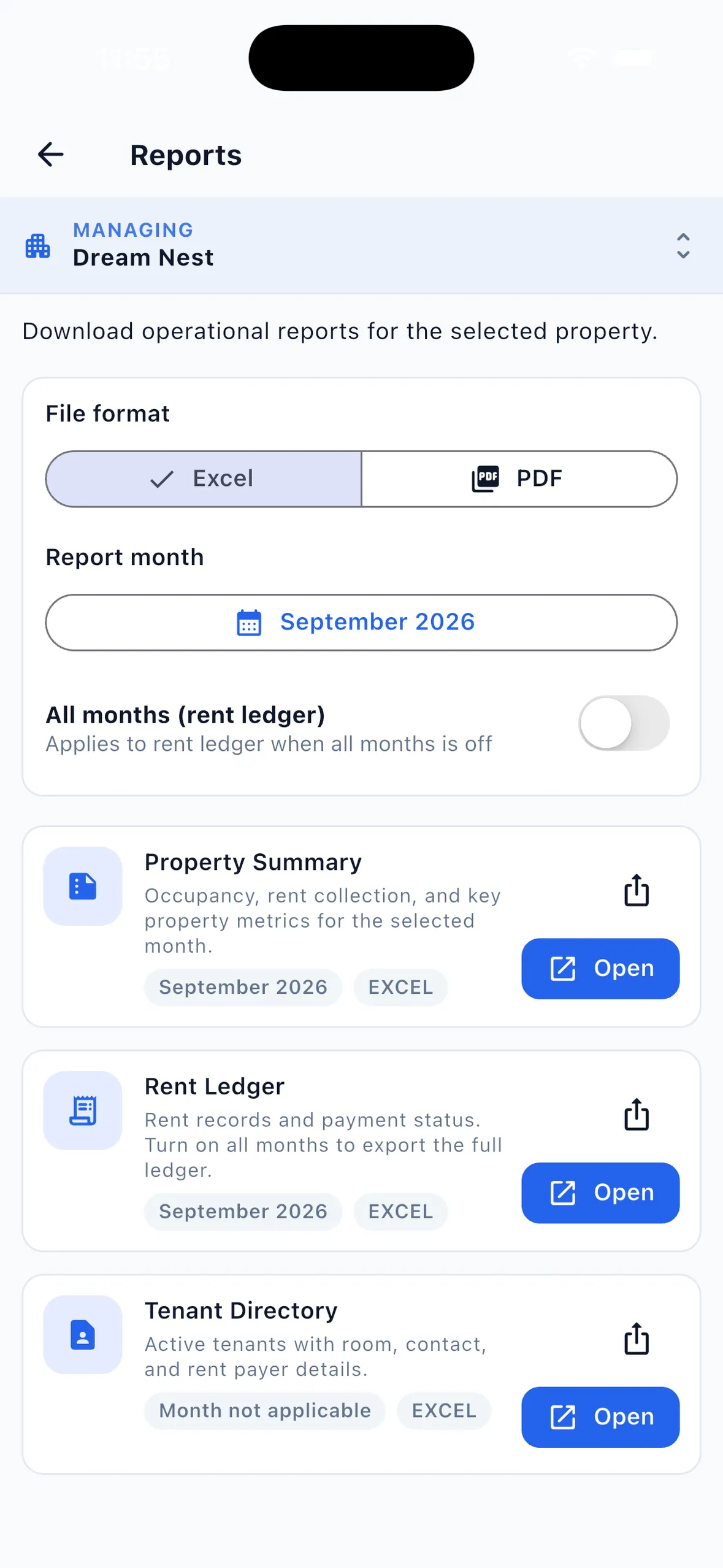
EasyAavaas has three reports, each for one property, in Excel or PDF, and shareable from the app by anyone with rent or payment-recording access:
- Property Summary for the month: billed, collected with percentage, pending and overdue amounts and counts, rooms, occupied and vacant beds, occupancy and tenant counts by status.
- Rent Ledger for one month or all months: tenant, room, total due, paid, balance, payments, collected by, meter units, utility and status. This is your monthly rent pending report.
- Tenant Directory: current tenants with phone, room, bed, rent, deposit, status and move-in date.
There is no expense report, profit and loss statement or deposit report. For collected, pending, overdue and occupancy figures at a glance during the month, see the analytics dashboard.
Worked example: closing October at an 18-tenant PG
Example (illustrative figures). Each of 18 tenants owes ₹7,000 rent and ₹400 electricity for October, so ₹1,33,200 is billed. Fifteen have paid in full and one has paid part.
| Check | Example result | Action |
|---|---|---|
| Billed for October | ₹1,33,200 (18 × ₹7,400) | Confirm every room's electricity is entered |
| Verified payments | ₹1,15,000 (15 × ₹7,400, plus a ₹4,000 part payment) | Match to the bank statement and cash book |
| Proof awaiting review | ₹7,400 (1 tenant) | Check the UPI credit, then approve or reject |
| Part-paid balance | ₹3,400 (1 tenant) | Agree a date and note it |
| Unpaid | ₹7,400 (1 tenant, overdue) | Call, then send a manual reminder |
| Outstanding on records | ₹18,200 | ₹7,400 + ₹3,400 + ₹7,400 |
| Cash recorded by the warden | ₹21,000 (Collected By column) | Confirm the cash was handed over |
| Deposits | 1 deposit with ₹5,000 remaining; 1 refund of ₹10,000 due | Collect the balance; record the refund when paid |
| Open issues | 3 complaints, 1 room-change request, 1 key to collect | Assign each one before closing |
Verified payments plus outstanding balances equal the amount billed: ₹1,15,000 + ₹18,200 = ₹1,33,200. The deposit figures stay outside those rent totals. The manual step is matching the ₹1,15,000 of verified payments to what actually reached your bank account and cash box; EasyAavaas does not connect to your bank.
Which month-end checks are manual
- Matching recorded payments to bank, UPI and cash. EasyAavaas records payments but does not reconcile them with bank accounts.
- Counting cash handed over by staff.
- Recording expenses, salaries and repairs. There is no expense screen.
- Rent receipts, if a tenant asks. The app does not generate receipts; tenants get a notification when a payment is recorded or verified.
- Tax, GST and accounting entries. Take advice from your accountant.
- Combining several properties into one report. Reports are per property.
Common month-end mistakes
- Approving payment screenshots without checking the money arrived.
- Counting deposits as monthly income.
- Closing the month before electricity and other charges are entered.
- Following up from an old list after tenants have already paid.
- Leaving complaints open with nobody assigned.
- Calling an operational close a reconciliation when nobody has matched the bank statement.
Questions about closing a PG month
Does EasyAavaas reconcile rent with my bank account?
No. EasyAavaas records payments, proofs and their verification status. Tenants pay you directly, and matching those records to your bank, UPI or cash is a manual step.
Which report shows pending rent for the month?
The Rent Ledger shows each tenant's total due, paid, balance and status for the month, and the Property Summary shows pending and overdue totals and counts. Both export to Excel or PDF for one property.
Can I see all my properties together at month end?
The home dashboard and the rent, deposit and complaint lists can show all your properties together. Reports are generated per property, so export one set for each.
Does the app create a profit and loss statement?
No. There is no expense tracking, deposit report or profit and loss statement. Keep expenses in your own records and ask your accountant about accounts and tax.
Is this checklist the same as a monthly accounting close?
No. It is an operational close of rent, payments, deposits, charges and open issues. Bookkeeping and bank reconciliation are separate tasks.
Related guides and tools
- Analytics dashboard: collected, pending, overdue and occupancy at a glance
- Rent management software: monthly records, reminders and proof review
- Free PG rent register template if you also keep a monthly register in Excel
- PG rent management guide
- PG deposit and checkout records