
PG Maintenance Checklist and Complaint Follow-Up Routine
Keep routine property checks on a checklist, log tenant complaints in one register with priority and status, and follow each repair through to closure.
Short answer
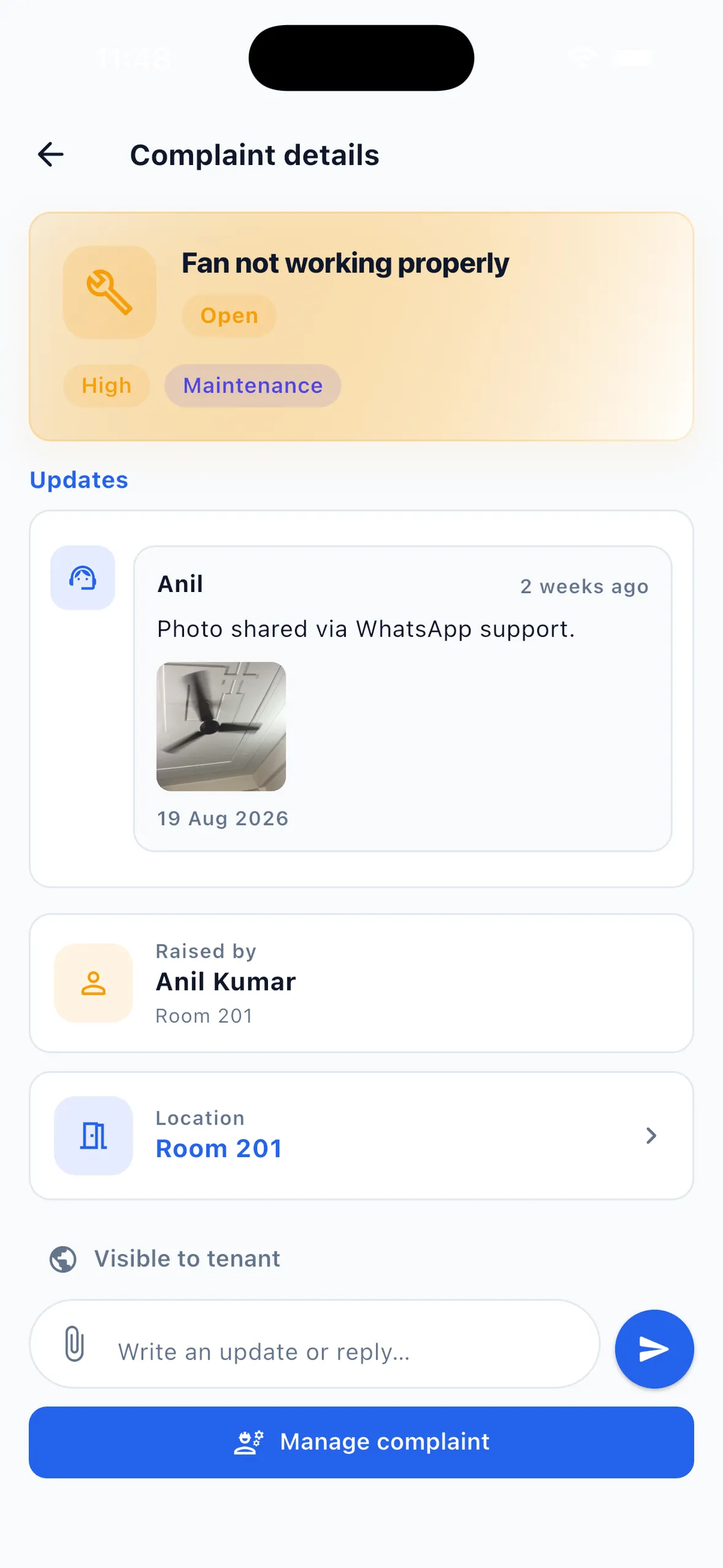
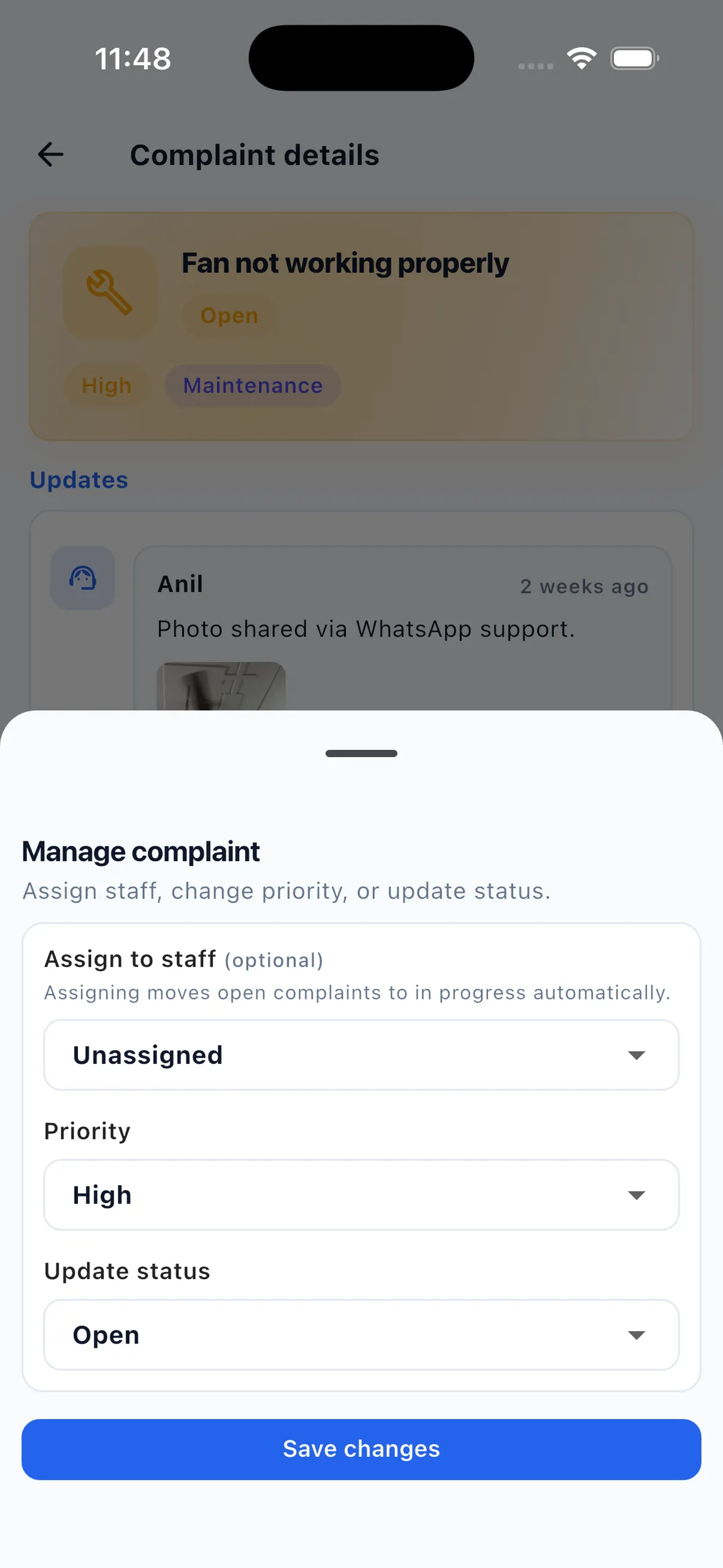
Keep two lists. A PG maintenance checklist covers routine checks you schedule yourself, such as water tanks, geysers, wiring, fire extinguishers and pest control; EasyAavaas does not schedule or automate these. Tenant complaints go into the EasyAavaas complaint register with a category, a priority from Low to Urgent, photos and a status: Open, In progress, Resolved, Closed or Reopened. Complaints left unresolved for 24 hours are escalated automatically.
Repairs slip through when routine checks and tenant complaints share one WhatsApp chat. This guide separates the two: a PG maintenance checklist for the building, and a complaint follow-up routine for problems tenants report, so rental room repair tracking has one clear place. It includes an example triage, the complaint statuses EasyAavaas supports, and what stays on paper.
Recurring property checks: a PG maintenance checklist
These checks happen whether or not anyone complains. EasyAavaas has no scheduled or preventive maintenance feature, so keep this list on paper or in a spreadsheet, put a name against each line and set reminders in your own calendar. Follow the servicing intervals your equipment suppliers recommend and any local rules that apply to your building; the intervals below are a starting point, not a standard.
| Frequency | Checks |
|---|---|
| Daily | Common areas and bathrooms cleaned; water pump and motor working; main gate and corridor lights; CCTV recording, if installed |
| Weekly | Geysers and water purifiers working; leaks under sinks and around taps; fans and lights in common areas; garbage collection |
| Monthly | Water tank level and cleanliness; electrical boards for heat or a burning smell; fire extinguisher gauge and expiry date; signs of pests |
| Quarterly | Tank cleaning; pest control; purifier filter change; wiring and earthing checked by an electrician |
| Before each move-in | Fan, lights, switches, taps, lock and keys, mattress and furniture in the room |
When a check finds a problem, turn it into a tracked job. The owner, a manager or a warden can log it as a complaint in EasyAavaas, for example "Geyser not heating, 2nd-floor bathroom", so it gets a priority, an assignee and a status; plain staff accounts need that permission switched on by the owner. If a room cannot be used until the repair is done, mark the room as under maintenance.
Tenant complaints: how the PG complaint register works
Tenants raise complaints in the app with a category (cleaning, electrical, plumbing, food, noise, safety, maintenance, security, payment or other) and can attach photos or documents. Complaints and photos can also arrive through the EasyAavaas WhatsApp assistant and land in the same register. The assistant is included free after your account is activated — message the EasyAavaas team on WhatsApp (+91 78787 65818) to request access.
| Status | Use it when | Tenant notified? |
|---|---|---|
| Open | The complaint is logged and nobody has taken it yet | — |
| In progress | Someone is working on it; assigning a staff member moves an open complaint here automatically | Not for the status change or assignment itself; post a public update |
| Resolved | The work is done and you are checking with the tenant | Yes: push and, by default, WhatsApp |
| Closed | The tenant has confirmed, or no further action is needed | Yes: push and, by default, WhatsApp |
| Reopened | The problem came back or was not fixed | — |
Priorities are Low, Medium, High and Urgent. Updates are either public, which the tenant sees, or internal staff notes for things like vendor quotes and costs. Photos and documents can be added when the complaint is created, with updates and at resolution. Managing complaints (assigning, changing priority and status) is open to the owner, managers and wardens by default.
Escalation when a complaint is not resolved
EasyAavaas checks complaints once a day at 10:00 IST. A complaint unresolved for 24 hours or more has its priority raised by one level, and owners, managers and the assigned staff member are alerted. Because the check runs daily, escalation happens at the first daily check after the 24 hours have passed. Treat it as a safety net, not a repair schedule, and set your own response targets for each priority.
Example triage: four complaints on a Monday morning
Example (illustrative rooms and issues). A warden opens the complaint list at 9 am and finds four new complaints.
| Complaint | Category and priority | First action | Follow-up |
|---|---|---|---|
| No water in 2nd-floor bathroom | Plumbing · Urgent | Assign the plumber on call; public update: "Plumber arriving by 11 am" | Resolve with a photo of the fixed valve; close after the tenant confirms |
| Fan not working, Room 201 | Electrical · High | Assign the electrician; internal note with the part needed | Public update when the part arrives; resolve the same day if possible |
| Wi-Fi slow on 3rd floor | Other · Medium | Restart and check the router; public update with an expected time | If the provider must visit, keep it In progress with dated updates |
| Loud music late at night, Room 305 | Noise · Low | Speak to the tenants in Room 305 privately | Close with a note once it stops; reopen if it returns |
If the bathroom problem affects the whole floor, publish a notice as well, so tenants who have not complained know it is being handled. See how to send a notice to all PG tenants.
A follow-up routine for managers and wardens
- Check new complaints at a fixed time each morning and evening.
- Set the category and priority, then assign someone. Assignment moves the complaint to In progress.
- Post a public update saying what will happen and when. Tenants are notified of public updates, not of a status change or assignment alone.
- Keep costs, vendor names and internal discussion in internal notes.
- Resolve with a short note and, where useful, a photo of the finished work. The tenant is notified.
- Close once the tenant confirms or after a reasonable check; reopen if the problem returns.
- At month end, review anything still open as part of the PG month-end checklist.
Managers and wardens have the same complaint access by default, while plain staff accounts need permissions switched on by the owner. More on the day-to-day manager workflow: EasyAavaas for managers and wardens.
Common mistakes with hostel complaint follow-up
- Mixing routine checks and complaints in one chat, so neither is tracked.
- Marking everything Urgent. Keep Urgent for safety risks and water or power failures.
- Assigning a complaint but never posting a public update, so the tenant thinks nothing is happening.
- Resolving without checking with the tenant.
- Writing costs or vendor details in public updates.
- Relying on the 24-hour escalation instead of your own response targets.
What the app supports and what stays manual
| Task | In EasyAavaas | Manual or outside the app |
|---|---|---|
| Tenant complaints | Yes: categories, priorities, photos, assignment, public and internal updates, five statuses | — |
| Complaints through WhatsApp | Yes, after WhatsApp assistant access is activated | — |
| Escalation | Yes: priority raised and owners and managers alerted after 24 hours unresolved | Your own response targets |
| Recurring maintenance schedule | No scheduled or preventive maintenance feature | Checklist and calendar reminders |
| Room out of use for repairs | Yes: mark the room under maintenance | — |
| Vendor bills and repair costs | No expense tracking | Your own records |
| Complaint report export | No complaint report; the complaint list is the register | Note monthly counts yourself if you track trends |
Questions about PG maintenance and complaints
Does EasyAavaas schedule routine maintenance?
No. There is no scheduled or preventive maintenance feature. Keep recurring checks on a checklist with your own calendar reminders, and log any problem a check finds as a complaint so it is tracked.
What complaint statuses does EasyAavaas use?
Open, In progress, Resolved, Closed and Reopened. Assigning a staff member moves an open complaint to In progress automatically.
Are tenants told when their complaint is fixed?
Yes. Tenants are notified by push and, by default, WhatsApp when their complaint is resolved or closed and when a public update is posted. They are not notified for a status change or assignment alone.
What happens if a complaint is left unresolved?
A daily check at 10:00 IST raises the priority of any complaint unresolved for 24 hours or more by one level, and alerts owners, managers and the assigned staff member.
Can tenants send complaints with photos on WhatsApp?
Yes, after WhatsApp assistant access is activated. The assistant asks whether a photo is payment proof or complaint evidence, and complaints go into the same register as the app. The assistant is included free; message the EasyAavaas team on WhatsApp at +91 78787 65818 to request access.
Related guides and features
- Complaint management system for PGs, hostels and co-living
- How to send a notice to all PG tenants
- EasyAavaas for managers and wardens
- PG inventory and items issued to tenants for damaged furniture
- PG month-end checklist