Free PG owner resource · Excel download
PG inventory register template (Excel)
The EasyAavaas PG inventory register is a free Excel template for recording furniture, keys and other items in a PG, hostel or co-living property, including the items issued to tenants: item ID, category, location, condition at issue and return, issue and return dates and the tenant’s acknowledgement. Download it without signing up. The EasyAavaas app has its own inventory module; this file is the paper-friendly manual aid.
By EasyAavaas Team · Updated
Download the inventory register
Three sheets: Instructions, a fictional Worked example and a Blank register. Columns: item ID, item, category, location or room, condition at issue, issued to (tenant reference), issue date, acknowledgement, return date, return outcome, condition at return, checked by and notes. The Status column is a formula; a summary counts items with tenants, not acknowledged, returned, lost and rows to check.
Version 1 · 23 October 2026 · 200 entry rows · Excel .xlsx · No macros · No signup
One example, row by row
A fictional PG with five items: a key with a tenant, a chair returned in worse condition, a shared router, a mattress waiting for the tenant’s signature and a key reported lost.
| Item ID | Item | Category | Location / room | Condition at issue | Issued to | Issue date | Acknowledged | Return date | Outcome | Condition at return | Status |
|---|---|---|---|---|---|---|---|---|---|---|---|
| KEY-101A | Room and main door key | Keys and access | Room 101 | Good | T-01 | 01 Oct 2026 | T-01 initials | — | — | — | With tenant |
| CHR-102-1 | Study chair | Furniture | Room 102 | Good | T-03 | 05 Jun 2026 | T-03 initials | 30 Sep 2026 | Returned | Fair | Returned |
| RTR-F1 | Wi-Fi router | Electronics | First floor corridor | Good | — | — | — | — | — | — | Shared / in store |
| MAT-103A | Mattress | Bedding | Room 103, bed A | New | T-05 | 01 Oct 2026 | — | — | — | — | Issued, not acknowledged |
| KEY-104W | Wardrobe key | Keys and access | Room 104 | Good | T-07 | 01 Jul 2026 | Signed sheet 07 | 15 Oct 2026 | Lost | — | Lost |
How to use the PG inventory register
- Walk through the property and give every item you hand out or want to track an ID. Write it on the item with a marker or label, for example KEY-101A.
- List shared items (router, fridge, fire extinguisher) with Issued to left empty.
- When you hand an item to a tenant, fill Issued to with their tenant reference, the issue date and the condition. Ask them to initial a printed copy and note it under Acknowledged.
- At return or move-out, enter the return date, choose Returned or Lost, and record the condition and who checked it. When the item is issued again, add a new row with the same item ID so the history stays.
- Before a move-out, filter the register by the tenant reference and check that every item shows Returned or Lost.
What the Status column checks
- Shared / in store: no tenant in Issued to.
- Issued, not acknowledged: issued with a date but no acknowledgement yet.
- With tenant: issued and acknowledged, not yet returned.
- Returned or Lost: return date, outcome and (for Returned) condition filled in.
- Rows to check: Check inputs (item ID or name missing, or return details without a tenant), Check dates (return before issue), Add issue date, Add return date, Add return outcome or Add return condition.
Conditions use the same scale as the EasyAavaas app: New, Excellent, Good, Fair, Poor, Broken. The file does not value items, track depreciation or count stock quantities.
Keep personal records out of the file
Use tenant references such as T-101, not phone numbers, identity numbers or photos of documents. Keep the filled file private and share it only with staff who hand out items. The example rows are fictional and sit on their own sheet, so the Blank register starts empty.
Inventory in EasyAavaas today
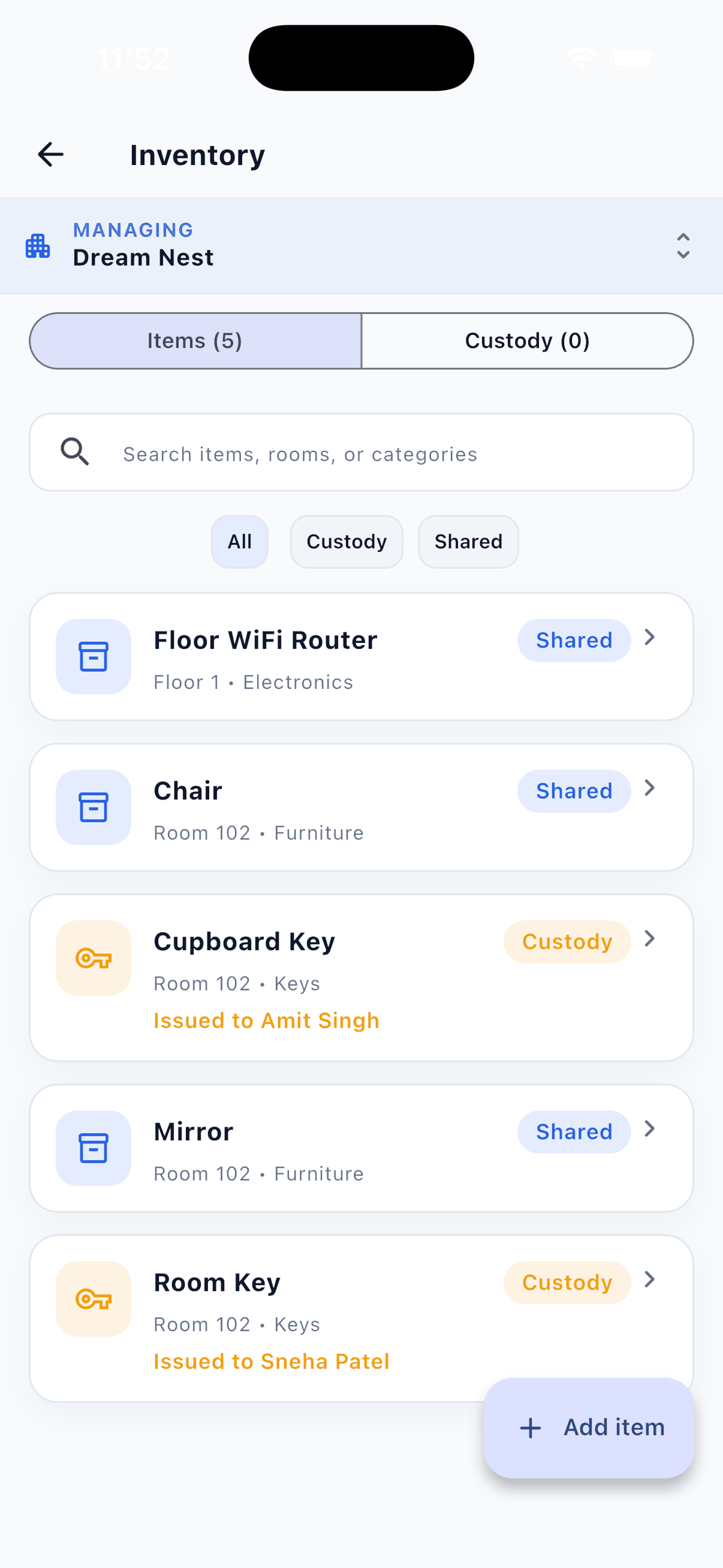
EasyAavaas has an inventory module. Owners, managers and wardens add items to a property, floor or room, mark each one as shared or issued to a person, and record category, quantity, serial number, condition, purchase date and value. Issuing an item to a tenant or taking it back (as returned or lost, with condition and a note) is logged in the item’s activity history, and the tenant is notified.
Items still with a tenant block their move-out or room change until they are returned; an owner can override this. Each item can be set to be collected on a room change or when the tenant leaves the property. The app does not scan barcodes, calculate depreciation or handle purchasing.
This file stays useful as a manual aid: printed sign-off sheets, periodic stock checks and the records you kept before setting up the app. EasyAavaas does not import it, so add items in the app by hand. It is free forever for owners, staff and tenants. Read how to manage PG inventory and tenant items, see tenant records and move-out in EasyAavaas, and use the deposit and checkout guide at move-out.
Common questions
What should a PG inventory register include?
An item ID written on the item, what it is, its category and location, its condition when issued, who it was issued to (a tenant reference), the issue date, the tenant’s acknowledgement, and at return the date, outcome (returned or lost), condition and who checked it.
Do I need the tenant to sign for items?
A signature or initials on a printed issue sheet gives both sides a clear record of what was handed over and in what condition. Note the acknowledgement in the register; until then the row shows Issued, not acknowledged.
How should I handle a damaged or lost item?
Record the return condition or mark it Lost, write what was agreed in Notes, and record any amount kept from a deposit in your deposit record with the tenant’s acknowledgement. Follow your agreement and local rules.
Can I import this register into EasyAavaas?
No. EasyAavaas does not import Excel or CSV files. Add items in the app’s inventory module by hand, starting with keys and the items currently issued to tenants.
Should shared items such as the fridge or router be listed?
Yes. Leave Issued to empty and the status shows Shared / in store. Listing them gives you one place for condition checks and replacements.
Free forever for PG owners
Know which items are with which tenant.
EasyAavaas logs items issued to and returned by tenants, and checks for unreturned items before a tenant moves out. Free forever for owners, staff and tenants.