

How to Send a Notice to All PG Tenants on WhatsApp and in the App
Follow one maintenance notice from draft to delivery, see who receives it and who can send it, and copy short English and Hinglish templates.
Short answer
To send a notice to all PG tenants, publish it once from Notices & Updates in the EasyAavaas app. Every active member of that property, tenants and staff, gets it as a push notification and in the in-app inbox, and on WhatsApp or SMS depending on each person's notification settings. Choose Notice for planned information or Update for something urgent. Delivery to every phone is not guaranteed, and the app does not show who has read a notice.
A WhatsApp group works until a tenant leaves it, a new tenant is never added, or an important message is buried under chat. This guide shows how to send a notice to all PG tenants in one step, following one maintenance notice from first draft to delivery. It explains who receives it and who is allowed to send it, then covers corrections and the limits of any notice in an emergency. Short reusable templates in English and Hinglish are near the end.
Who receives a PG WhatsApp announcement from EasyAavaas
A notice goes to every active member of the property you choose: current tenants and your staff. Tenants who have moved out are no longer active members, so they are not included. If you run several properties, you can send the same notice to all of them at once.
Each recipient gets a push notification and a copy in their in-app inbox. They may also receive it on WhatsApp, which is on by default, or by SMS, depending on their notification settings, and a tenant can mute WhatsApp messages for a category. Notices on WhatsApp do not need the WhatsApp assistant, and EasyAavaas absorbs the messaging cost.
The app cannot send a notice to tenants only or to selected people. That is possible only through the EasyAavaas WhatsApp assistant, which is included free after your account is activated — message the EasyAavaas team on WhatsApp (+91 78787 65818) to request access.
Who can send notices: permissions
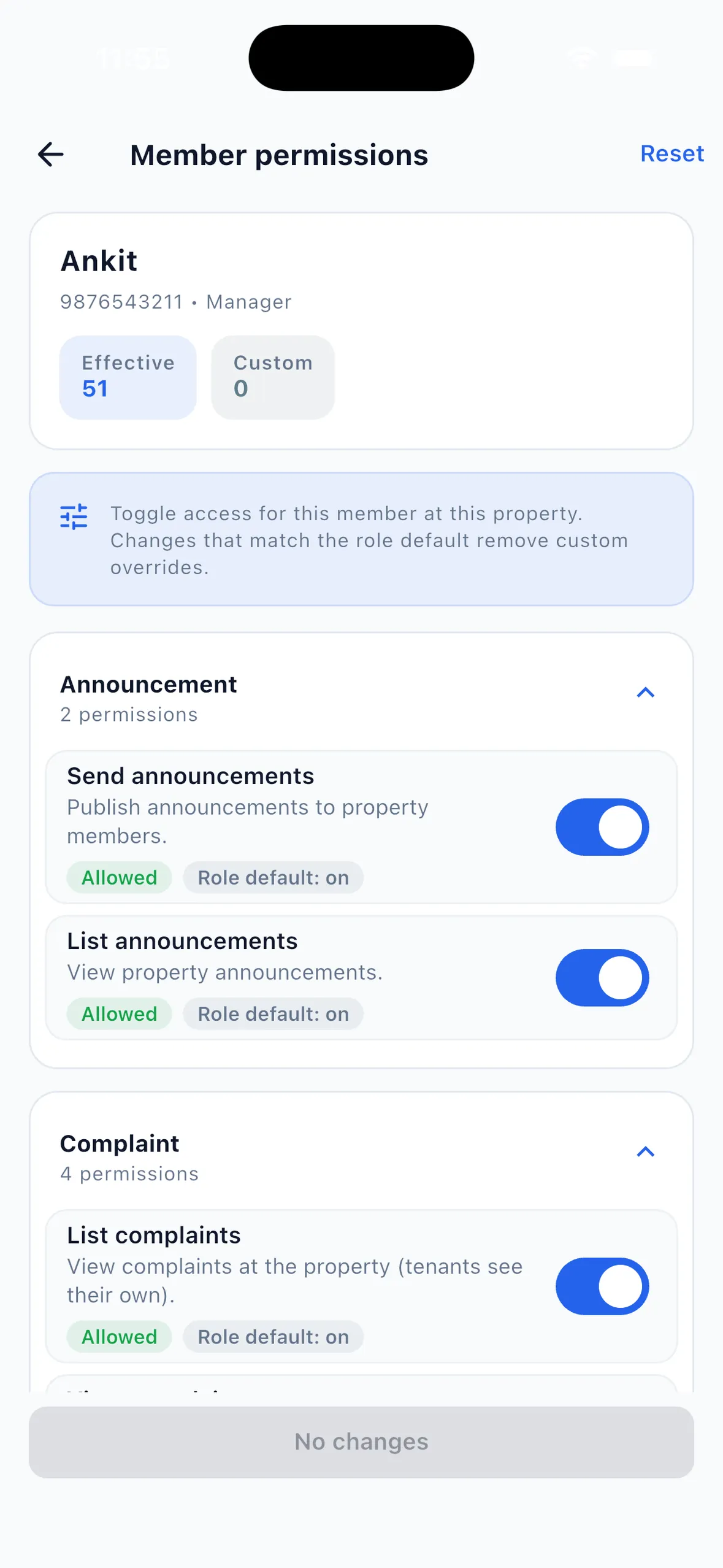
By default the owner, managers, wardens, staff, accountants and support members can all publish notices; tenants can only read them. That is a wide group, so decide who speaks for the property. On the Member permissions screen the owner can switch Send announcements off for a particular person, and the screen shows the role default next to any custom setting. See role-based access control for the full permission list.
One maintenance notice from draft to delivery
Example (illustrative property and dates). The water tank at a 30-bed PG needs cleaning. Water will be off on Saturday, 7 November, from 10 am to 2 pm. The owner publishes a notice four days ahead and updates on the day.
- Write the message first. Notices have no separate title, so the first words should say what it is about. Cover what is happening, when, what tenants should do and whom to contact.
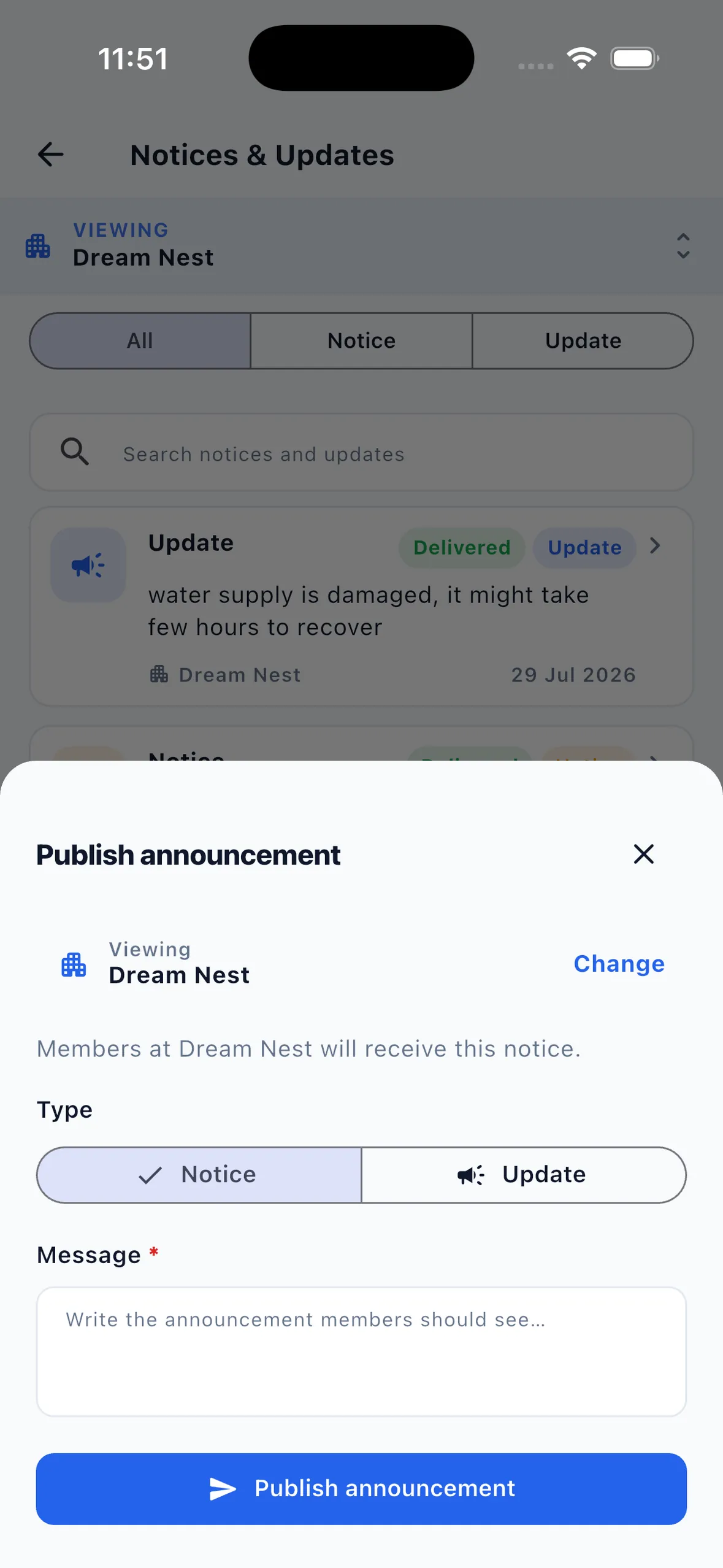
- Open Notices & Updates and check the property. The publish sheet shows the property you are viewing and states that its members will receive the notice. Tap Change for a different property, or send to all your properties if the notice applies everywhere.
- Choose the type. Pick Notice for planned information. Keep Update for time-sensitive, high-priority messages, so tenants learn that an Update needs attention.
- Publish the announcement. Every active member gets the push notification and inbox copy, plus WhatsApp or SMS according to their settings.
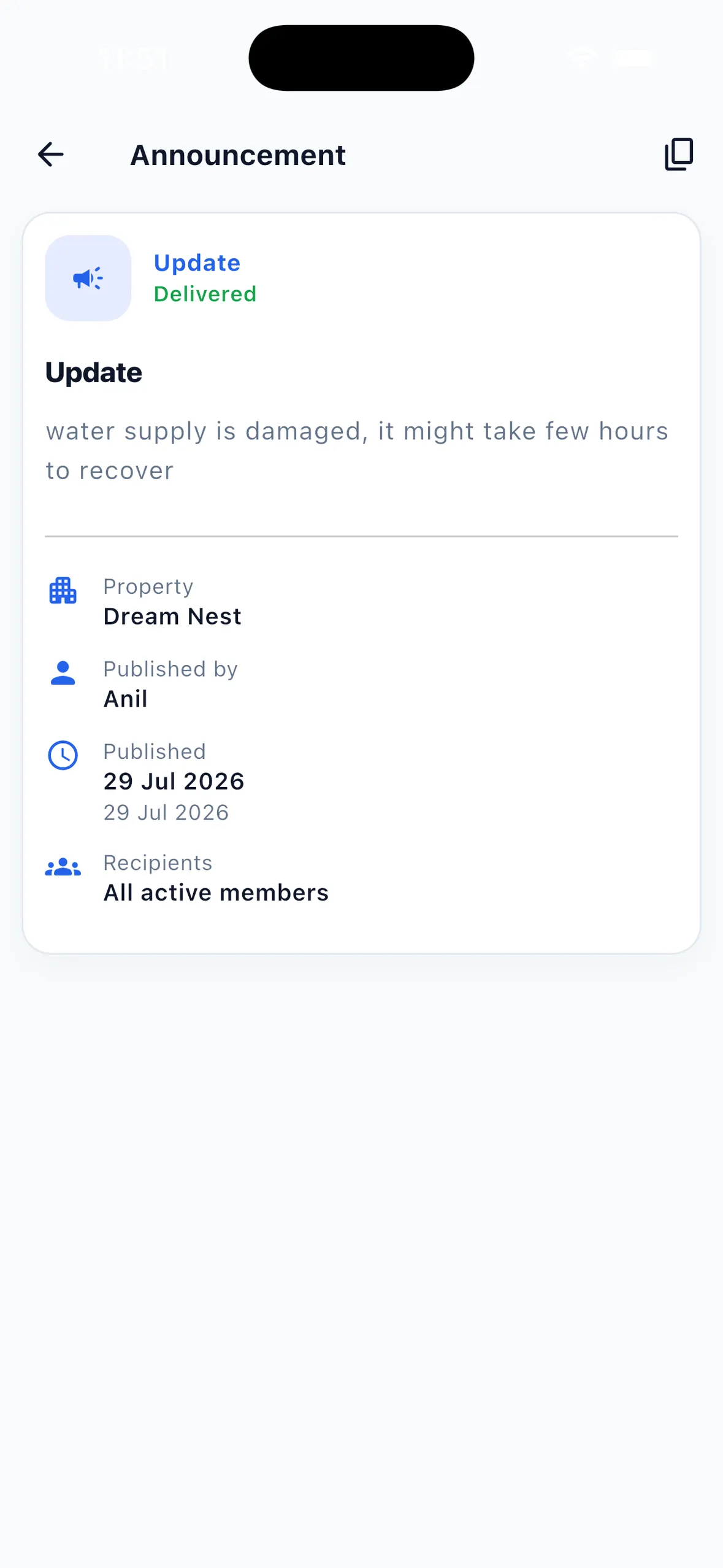
- Check the record. Open the notice to see its status, who published it, when, and the recipient scope, such as All active members. This confirms the notice was sent to that group; it does not show which tenants opened or read it.
- Follow up on the day. On Saturday morning, publish a short Update: "Water will be off from 10 am today for tank cleaning." When the work is done, send a final Update saying the supply is back.
- Handle problems as complaints. If a tenant still has no water afterwards, log it as a complaint so it gets an owner, a priority and a status in the complaint management system.
The example notice in English: "Water tank cleaning: water supply will be off on Saturday, 7 November, from 10 am to 2 pm. Please store water the night before. For help, call the warden on [number]." The same notice in Hindi: "पानी की टंकी की सफ़ाई: शनिवार, 7 नवंबर को सुबह 10 बजे से दोपहर 2 बजे तक पानी बंद रहेगा। कृपया एक रात पहले पानी भरकर रखें। मदद के लिए वार्डन को [नंबर] पर कॉल करें।"
Corrections: publish a complete new message
Treat a published notice as final. If a date, time or instruction was wrong, publish a correction straight away as a new message that starts with "Correction:" and repeats the full corrected detail, so a tenant who reads only the latest message still has the right information. Use Update if the correction affects something happening within a day. One complete correction is clearer than several partial ones.
Limits for urgent communication
- A notice is not an emergency alarm. For fire, a gas smell, electrical danger or a medical emergency, call the emergency services (112 in India) and alert people in person first.
- Delivery is not guaranteed. Phones may be off, offline or set to block notifications, and a tenant may have muted WhatsApp messages. For anything critical, follow up by phone or in person with the people affected.
- There are no read receipts. The app records that the notice was sent and to which group, not who read it. If you need confirmation, ask the affected tenants to reply to you directly.
- Consent and choice still matter. Tell tenants at move-in that property notices come through the app and WhatsApp, respect their notification choices, and use notices for property matters only, not promotions.
- A notice reaches the whole property. For messages meant for certain rooms or people, speak to them directly or use the activated WhatsApp assistant.
Reusable hostel and PG notice message templates
Replace the text in square brackets. Keep each notice to two or three sentences and sign it with the property or manager name. For rent follow-ups, use the WhatsApp rent reminder templates instead; EasyAavaas sends automatic rent reminders separately from notices.
| Situation | English | Hinglish |
|---|---|---|
| Planned water shutdown | Water supply will be off on [day, date] from [time] to [time] for [tank cleaning]. Please store water in advance. — [Property name] | [Day, date] ko [time] se [time] tak [tank cleaning] ke liye paani band rahega. Kripya pehle se paani bhar kar rakhein. — [Property name] |
| Electricity work | Power will be off on [floor] on [day] from [time] to [time] for [repair work]. Please charge your phones and laptops before [time]. | [Day] ko [time] se [time] tak [floor] par [repair work] ke liye bijli band rahegi. Apne phone aur laptop [time] se pehle charge kar lein. |
| Pest control | Pest control will be done in all rooms on [day] at [time]. Please cover food items and keep cupboards closed. A staff member will be present. | [Day] ko [time] baje sabhi rooms mein pest control hoga. Khane ka saamaan dhak kar rakhein aur almirah band rakhein. Staff ka ek member saath rahega. |
| Correction | Correction: [the water shutdown] is on [correct day, date], not [wrong day]. The time is unchanged: [time] to [time]. | Sudhaar: [paani band] [galat din] ko nahi, [sahi din, date] ko hai. Samay wahi hai: [time] se [time]. |
| Work complete | [Tank cleaning] is complete and [the water supply] is back. If you still face a problem, raise a complaint in the app. | [Tank cleaning] ho gayi hai aur [paani] wapas aa gaya hai. Agar ab bhi dikkat ho, to app mein complaint darj karein. |
| House rule reminder | Reminder: [the main gate closes at 11 pm]. Please tell the warden in advance if you will be late. | Yaad dilana: [main gate raat 11 baje band hota hai]. Der se aana ho to warden ko pehle bata dein. |
Common mistakes with tenant broadcast updates
- Marking routine notices as Update, so tenants stop treating Update as urgent.
- Leaving out the time, or the action tenants must take.
- Posting the same notice in a WhatsApp group and in the app with different details.
- Assuming everyone read a notice because it was published.
- Using a property-wide notice for one tenant's rent or behaviour. Speak to that tenant privately.
- Letting every staff account publish without agreeing who speaks for the property.
What the app does and what stays manual
| Task | In EasyAavaas | Manual or outside the app |
|---|---|---|
| Notice types | Notice, and Update for high priority | — |
| Recipients | All active members of one property, or of all your properties at once | Tenants only or named people: the activated WhatsApp assistant, or contact them directly |
| Channels | Push, in-app inbox, and WhatsApp or SMS per recipient settings | Phone calls and in-person announcements for urgent matters |
| Who can publish | Set by role, with per-member switches for the owner | Agreeing who speaks for the property |
| Delivery record | Status, publisher, date and recipient scope | Checking that key people actually saw it |
| Corrections | Publish a new notice or update | Phoning anyone working to a deadline |
| Problems after a notice | Complaints with status, priority and photos | — |
Questions about sending PG notices
Can I send one notice to all my PG tenants on WhatsApp?
Yes. Publish it once in the EasyAavaas app and every active member of the property gets a push notification and an inbox copy, plus WhatsApp or SMS according to their notification settings. WhatsApp is on by default, but a tenant can mute it, so not every tenant will necessarily receive it on WhatsApp.
Does the notice go to staff as well as tenants?
Yes. A notice goes to all active members of the property, which includes staff. To reach only tenants or named people, use the EasyAavaas WhatsApp assistant after your account is activated, or contact them directly.
Can I see which tenants have read a notice?
No. The notice shows its status, who published it, when, and the recipient scope, but not who opened or read it. For important notices, ask the affected tenants to confirm directly.
Who can publish notices in EasyAavaas?
By default the owner, managers, wardens, staff, accountants and support members can publish, and tenants can only read. The owner can switch the Send announcements permission off for any member.
Is there a charge for sending notices on WhatsApp?
No. EasyAavaas is free forever for owners, staff and tenants, and EasyAavaas absorbs the WhatsApp messaging cost. Notices on WhatsApp do not need the WhatsApp assistant to be activated.
Related guides and features
- WhatsApp assistant and WhatsApp updates for PGs
- Role-based access control for owners, managers and staff
- Complaint management system for problems tenants report after a notice
- PG maintenance checklist and complaint follow-up
- WhatsApp rent reminder templates
- PG electricity and extra charges, including how to announce a rate change